JDBC: Java Database Connectivity
JDBC (Java Database Connectivity) is a standard API for connecting to and interacting with databases.
Spice supports JDBC clients through a JDBC driver implementation based on the Flight SQL protocol. This enables any JDBC-compatible application to connect to Spice, execute queries, and retrieve data.
Download and install the Flight SQL JDBC driver
Download the Flight SQL JDBC driver
- Find the appropriate Flight SQL JDBC driver version.
- Click Browse next to the version you want to download
- Click the
flight-sql-jdbc-driver-XX.XX.XX.jarfile (with only the.jarfile extension) from the list of files to download the driver jar file
Add the driver to your application
Follow the instructions specific to your application for adding a custom JDBC driver. Examples:
Tableau:
- Windows:
C:\Program Files\Tableau\Drivers - Mac:
~/Library/Tableau/Drivers - Linux:
/opt/tableau/tableau_driver/jdbc - Start or restart Tableau
JetBrains DataGrip:
- In Database Explorer menu, select "+" and choose "Driver"
- Follow the steps to add the JDBC
.jarfile
DBeaver:
- In the DBeaver application menu bar, open the "Database" menu and choose: "Driver Manager"
- Click the "New" button and follow instructions to add JDBC
.jarfile.
Configure JDBC connection
- Use the following configuration settings:
- URL:
jdbc:arrow-flight-sql://{host}:{port} - Dialect:
PostgreSQL
For example:
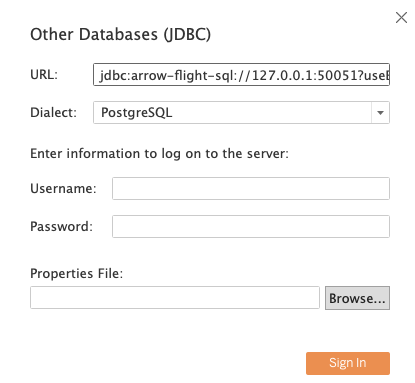
- Ensure Spice is running
- Click Connect
Spice has TLS support. For testing or non-production use cases for Spice without TLS, the following JDBC connection URL will bypass TLS jdbc:arrow-flight-sql://{host}:{port}?useEncryption=false&disableCertificateVerification=true.
Authentication
If API Key authentication is enabled, the API key can be provided in the JDBC connection URL as a query parameter:
jdbc:arrow-flight-sql://{host}:{port}?user=&password=<enter-api-key-here>
Replace <enter-api-key-here> with the API key value. The user and password parameters are required by the JDBC driver, but only the password parameter is used for the API key.
Execute Test Query
In the configured application, run a sample query, such as SELECT * FROM taxi_trips;
Parameterized Queries
Spice supports parameterized queries with JDBC. Parameterized queries help prevent SQL injection and improve code clarity by separating query logic from data values.
Cookbook
- A cookbook recipe to query Spice from Java with the Flight SQL JDBC driver and parameterized queries. Java JDBC Client with Parameterized Queries
- A cookbook recipe to query Spice from Scala with the Flight SQL JDBC driver and parameterized queries. Scala JDBC Client with Parameterized Queries
