Spice Cayenne Data Accelerator
Spice Cayenne is a data acceleration engine designed for high-performance, scalable query on large-scale datasets. Built on Vortex, a high-performance columnar file format, Spice Cayenne combines columnar storage with in-process metadata management to provide fast query performance to scale to datasets beyond 1TB.
Why Vortex?
Spice Cayenne uses Vortex as its storage format, providing significant performance advantages:
- 100x faster random access reads compared to modern Apache Parquet
- 10-20x faster scans for analytical queries
- 5x faster writes with similar compression ratios
- Zero-copy compatibility with Apache Arrow for efficient data processing
- Extensible architecture with pluggable encoding, compression, and layout strategies
Vortex is a Linux Foundation (LF AI & Data) project under Apache-2.0 license with neutral governance. For performance benchmarks, see bench.vortex.dev.
Spice Cayenne is recommended for any dataset of 10 GB or larger. DuckDB suits smaller datasets, but its memory requirements grow faster: Cayenne typically needs one-third to one-half the memory of the DuckDB accelerator for the same dataset, and scales beyond the limits at which a single DuckDB file becomes impractical.
Architecture
Spice Cayenne follows a lakehouse architecture inspired by DuckLake, separating metadata management from data storage:
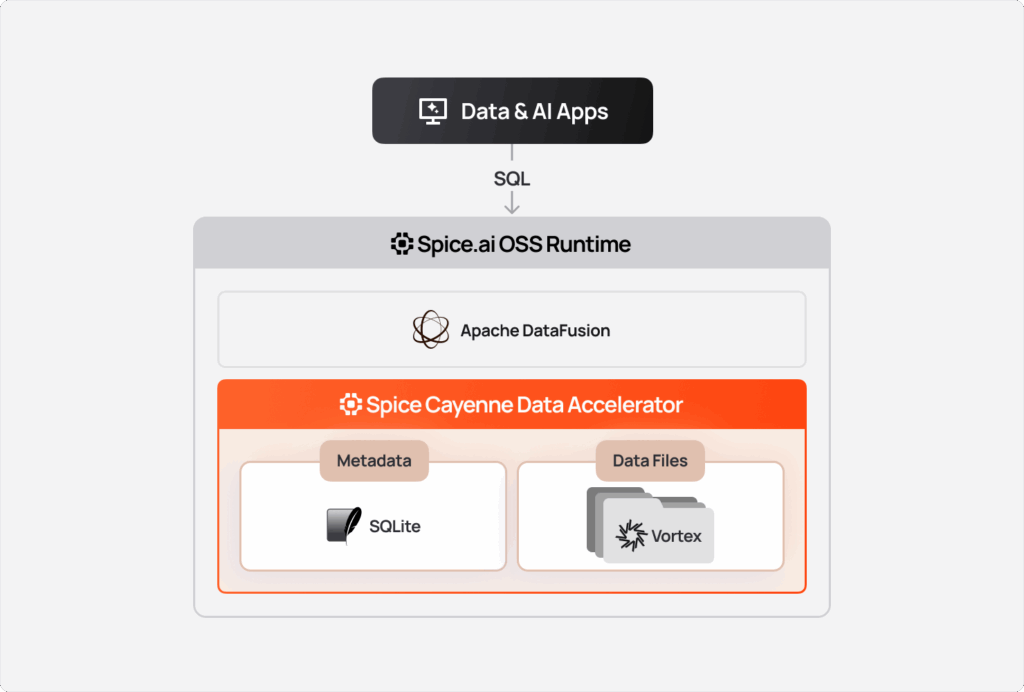
Key Design Principles:
- Virtual Files: Each "file" is a Vortex
ListingTableat a unique directory, enabling append operations and parallel reads - Lazy Statistics: Summary statistics are loaded on-demand for query optimization
- Sequence-based Ordering: Iceberg-style sequence numbers enable upsert semantics without requiring separate tracking of "undeleted" records (rows that were deleted and then re-inserted)
- Pluggable Storage: Data files can be stored locally or in S3 Express One Zone while metadata remains local
Storage Recommendations
For optimal performance, store Cayenne data files and the metastore on local NVMe storage, and point runtime.query.temp_directory at the same fast volume. What matters most is per-I/O latency rather than IOPS: Vortex's random-access reads are a chain of dependent segment reads and the metastore commits with fsync on every write, so the tens of microseconds an NVMe operation takes — against a millisecond or more on network storage — is multiplied along every query and every commit. Local NVMe on cloud instances is ephemeral, so pair it with acceleration snapshots for fast cold starts.
Network block storage (Amazon EBS, Azure Managed Disks, GCP Persistent Disk) works as a durable fallback: Cayenne detects it as the network-attached storage tier and adapts — larger inline flushes, an O_DIRECT compaction writer, and a write-concurrency cap derived from the volume's bandwidth — but every cache miss still pays the volume's per-read latency, so prefer a sub-millisecond tier such as io2 Block Express. Network file systems (NFS, SMB, EFS, Azure Files) are not recommended: the metastore is a SQLite database, and SQLite locking is unreliable on them. See Storage in the Cayenne performance guide and Storage in the Performance Tuning guide.
Use S3 Express One Zone when persistence of accelerations across restarts is required. S3 Express One Zone adds network latency compared to local NVMe but provides durability. Sharing accelerated data across multiple Spice instances is planned for a future release. Express One Zone is the Cayenne data tier (cayenne_file_path, cayenne_s3_*) only. Acceleration snapshots use snapshots.location on standard S3, GCS, or ADLS, and the cold tier uses cayenne_datalake_location on a general-purpose S3 or S3-compatible bucket. An Express directory bucket does not substitute for the snapshot bucket.
Configuration
Spice Cayenne is the default data accelerator on Linux and macOS: an acceleration that sets no engine uses Cayenne, in mode: memory unless it sets another mode. Cayenne is not available on Windows, where the default is Arrow. See Default Engine. To select Spice Cayenne explicitly, specify cayenne as the engine for acceleration. Spice Cayenne supports two storage modes:
mode: file(durable) — data is written as Vortex files on local disk or S3 Express One Zone, with a SQLite/Turso metastore, and the acceleration survives restarts. This is the recommended mode for Cayenne and is used in the examples throughout this page. Themode: file_createandmode: file_updatevariants control how an existing on-disk acceleration is reused or rebuilt on startup.mode: memory(ephemeral) — all data lives fully in RAM with an in-memory metastore; nothing is written to disk. The dataset is ephemeral and reloads from its source on restart (like the Arrow accelerator). Memory mode works for all refresh modes (full/append/changes) and for both keyed and no-primary-key datasets, but does not support partitioned tables (partition_by), and it enforces a hard per-table RAM bound rather than spilling to disk (seecayenne_cdc_mem_tier_max_bytes).INSERT,UPDATEandDELETEapply to the in-RAM tier the same way they apply to amode: fileacceleration — see Writes in memory mode.
datasets:
  - from: spice.ai:path.to.my_dataset
    name: my_dataset
    acceleration:
      engine: cayenne
      mode: file
Parameters
Spice Cayenne is configured through two distinct parameter scopes:
- Acceleration parameters are set per dataset under
acceleration.paramsand control how that dataset's accelerated data is stored, compressed, written, and compacted. - Runtime parameters are set once per instance under
runtime.paramsand control engine-global behavior — caches, optimizer rules, and dedicated memory pools — shared by every Cayenne-accelerated dataset.
The two scopes are not interchangeable: setting a runtime parameter under acceleration.params (or a per-dataset parameter under runtime.params) has no effect — the value is ignored.
Acceleration parameters (acceleration.params)
Set under a dataset's acceleration.params:
| Parameter | Description |
|---|---|
cayenne_tuning | Auto-tuning mode. Accepts auto or adaptive (preview). auto derives the memory-, CPU-, and storage-sensitive knobs statically from the detected environment (cgroup-aware cores and memory, storage class) and the inferred schema (cardinality, row width, primary key) — no feedback loop. adaptive additionally runs a per-table closed-feedback controller that measures the live CDC ingest rate (and delete fraction and arrival burstiness) and the runtime's response (apply latency vs. offered load, read amplification, memory pressure) and adjusts the inline-memtable flush caps, the in-memory CDC tier byte cap, compaction cadence/trigger, and write concurrency over time, within the environment-derived bounds. adaptive is reached only by setting it here — nothing else turns the closed loop on. An unset value, an unrecognized value (warned about, then treated as auto), inferred schema, and a configured cayenne_goal_* SLO all resolve to auto. adaptive needs a non-zero cayenne_compaction_background_interval_ms (the controller runs on the background compaction tick); if it is 0, Cayenne falls back to auto. Schema inference (always on) sharpens the adaptive warm-start but is not required — without inferred metadata the controller relearns the observed row width from live ingest. In both modes an explicit per-knob value overrides the derived value; under adaptive an explicitly-set knob is pinned (the loop will not move it). See Self-Tuning. |
cayenne_goal_replication_lag | Goal-driven adaptive tuning (preview): target end-to-end CDC replication lag, as a duration (e.g. 5s). Best set globally under runtime.params; a value here overrides the global setpoint for this dataset. When set, the closed-loop controller converges toward this SLO in small, bounded steps within cayenne_goal_convergence_window. Requires cayenne_tuning: adaptive on the dataset — a goal never enables the loop by itself; on a table left at the auto default it is ignored, with a warning. Goal-seeking also requires a non-zero cayenne_compaction_background_interval_ms. See Goal-driven tuning. |
cayenne_goal_freshness | Goal-driven adaptive tuning (preview): target data freshness — the age of the newest queryable data — as a duration (e.g. 30s). Best set globally under runtime.params; a value here overrides the global setpoint for this dataset. |
cayenne_goal_query_latency | Goal-driven adaptive tuning (preview): target p99 query latency on this table, as a duration (e.g. 250ms or 10s). Best set globally under runtime.params; a value here overrides the global setpoint for this dataset. |
cayenne_goal_convergence_window | Goal-driven adaptive tuning (preview): the time budget to converge toward the configured cayenne_goal_* SLOs, as a duration (e.g. 1m). Defaults to 60s. A per-dataset control-cadence knob — it paces how fast the loop chases the goals rather than declaring an outcome, so it is not part of the global SLO surface and has no runtime.params form. |
cayenne_compression_strategy | Compression algorithm for accelerated data. Defaults to btrblocks. Supports btrblocks or zstd. |
cayenne_delta_encoding | Encoding effort applied to delta (incremental) writes such as appends and inline-memtable flushes. Accepts auto (default) or a fixed level 0–10. Higher levels search more encoding schemes for a better compression ratio at the cost of more write-time CPU; auto encodes every delta write at a light level regardless of size, because deltas are transient staged streams that compaction later re-encodes with the full cascade. Levels 7–10 all apply the full default cascade, so set 7 to encode every delta with the full cascade instead. Applies at write time only — changing it never re-encodes existing data or forces a table re-create. Invalid values fall back to auto with a warning. |
cayenne_unsupported_type_action | Action when an unsupported data type is encountered. Defaults to error. See Data Type Support. |
cayenne_segment_cache_mb | Ignored here. The Vortex segment cache is one budget shared by every Cayenne table, so a per-dataset size has nothing to size. A value set under acceleration.params is reported at startup and otherwise has no effect — set runtime.params.cayenne_segment_cache_mb instead. |
cayenne_force_view_types | Whether scans emit Arrow view types (Utf8View/BinaryView) instead of native Utf8/Binary. Accepts true or false; defaults to false. View types are not compacted across RepartitionExec, so wide strings fanned out through a partitioned join can inflate query-pool memory reservations — the native types avoid that. Set to true to re-enable view types for a table. Any value other than false (case-insensitive) enables view types. |
cayenne_file_path | Custom path for storing Cayenne data files. Supports local paths or S3 Express One Zone URLs (e.g., s3://bucket--usw2-az1--x-s3/prefix/). |
cayenne_target_file_size_mb | Target size for individual Vortex files in MB. When writes exceed this size, a new Vortex file is created. Accepts auto (default) or an explicit MB value. auto is storage-aware: 256 MB on EBS-class network storage, 64 MB on RAM-backed (tmpfs) mounts, 512 MB on S3 Express (large immutable objects cut object count and per-request cost), and 256 MB on local SSD or unknown storage. Smaller files enable better parallelism and predicate pushdown. |
cayenne_metadata_dir | Directory for the Cayenne SQLite catalog (cayenne.db). When unset, a local cayenne_file_path selects {cayenne_file_path}/metadata; otherwise the directory is {spice_data_path}/metadata, including when cayenne_file_path is an object-store URL. An explicit path overrides both. Must resolve outside the dataset's data directory — see Metastore location. |
cayenne_metastore | Metastore backend type. Supports sqlite (default) or turso (requires turso feature flag). |
cayenne_upload_concurrency | Maximum number of concurrent file uploads when writing multiple Vortex files to S3 Express One Zone. Accepts auto (default) or an explicit value; auto uses the runtime's CPU entitlement in whole cores. The aggregate encode concurrency across all Cayenne tables is separately bounded by a process-global budget sized from that same entitlement, less a query reserve of a quarter of the cores (at least 2). |
cayenne_write_concurrency | Writer partition override for unsorted ingests, controlling how many Vortex files are encoded in parallel during a write. Accepts auto (default) or an explicit value. auto encodes up to min(4, session target_partitions) files in parallel per write — an intentionally small per-table default (not the full CPU entitlement), so many independently-writing tables do not oversubscribe CPU under concurrent CDC. An explicitly-set value is capped at the session target_partitions, which defaults to the runtime's CPU entitlement in whole cores; the aggregate encode concurrency across all Cayenne tables is separately bounded by a process-global budget sized from that entitlement. Values below 1 are clamped to 1. The sort-and-rewrite compaction path always writes serially regardless of this setting. |
cayenne_deletion_mode | How primary-key deletions are recorded and applied. Accepts auto, key, or position; defaults to auto, which resolves to position (merge-on-read) for most tables, or to key for CDC datasets (refresh_mode: changes) that declare a primary_key. See Deletion Strategies. |
cayenne_pk_conflict_detection | Controls primary-key conflict detection on insert. Accepts auto or none; defaults to auto, which detects existing primary keys and resolves them as merge-on-read upserts. Set to none to skip conflict detection (blind append) for append-only CDC workloads where the source guarantees primary-key uniqueness. |
cayenne_compaction_trigger_files | Minimum number of small Vortex files in the current snapshot before tiered compaction runs. A "small" file is one whose size is below cayenne_target_file_size_mb / 4. Defaults to 4 for refresh_mode: caching / changes, or append with refresh_check_interval ≤ 5m; 8 otherwise. A value of 1 is clamped to a minimum of 2. |
cayenne_compaction_trigger_protected_snapshots | Number of protected snapshots before snapshot-maintenance compaction runs. Separate from cayenne_compaction_trigger_files so small-file tuning does not silently change scan amplification behavior. Defaults to 4 for refresh_mode: caching / changes, or append with refresh_check_interval ≤ 5m; 8 otherwise. A value of 1 is clamped to a minimum of 2. |
cayenne_compaction_trigger_snapshot_age_ms | Maximum age in milliseconds of the oldest protected snapshot before snapshot-maintenance compaction runs. Set to 0 to disable the age trigger. Defaults to 60000 for refresh_mode: caching / changes, or append with refresh_check_interval ≤ 5m; 300000 otherwise. |
cayenne_compaction_max_levels | Maximum number of consecutive compaction passes per trigger. Bounds write amplification when promotion keeps producing new candidates. Defaults to 3. |
cayenne_compaction_max_files_per_pick | Maximum number of eligible file paths retained in one compaction candidate. For a table eligible for subset compaction — key-based deletes (cayenne_deletion_mode: key, including append-only tables), no configured sort_columns, and no protected snapshots — the runner rewrites only the picked candidate and carries the unpicked settled files into the new snapshot by hardlink (local filesystem) or copy (S3 or cross-device), so this value does bound rewrite IO and memory. A table using position deletes, a configured sort_columns (whose subset hardlinks would break the global sort attestation), or carrying protected snapshots (which the rewrite has to fold) still rewrites the whole current snapshot, and this value then only affects trigger selection and observability. Defaults to 32. |
cayenne_compaction_background_interval_ms | Background compaction interval in milliseconds. The accelerator runs a per-table background task at this interval. Set to 0 to disable the background task — inline compaction on writes still runs. Defaults to 10000 for refresh_mode: caching / changes, or append with refresh_check_interval ≤ 5m; 0 for refresh_mode: full, where each refresh replaces the whole table and leaves nothing for the background task to consolidate (set the parameter explicitly to turn it back on for a table that also takes INSERTs); 30000 otherwise. When refresh_mode is left unset the connector fills it in — debezium and cdc resolve to changes, sink to disabled, every other connector to full — so an unannotated dataset takes the full default here. |
cayenne_cdc_durability | Durability mode for the inline CDC write path. Accepts memory (default) or file. memory appends batches to an in-RAM tier and defers the source-slot acknowledgement to a periodic or cap-triggered checkpoint, collapsing per-batch durability cost; on crash the un-checkpointed tail is replayed from the source slot, and because the apply is primary-key-idempotent this remains exactly-once. The in-memory path is eligibility-gated — it applies only to the small-write / CDC profile on non-partitioned tables, and other profiles always use file. file persists each CDC batch durably before advancing the source slot and is the conservative opt-out. |
cayenne_cdc_mem_tier_max_bytes | Per-table RAM-tier byte cap that forces a spill (checkpoint) and source-slot advance, in cayenne_cdc_durability: memory mode only. Auto-derived from host memory (~1/64 of RAM, clamped to 256 MiB–1 GiB; 256 MiB on hosts at or under 16 GiB). A process-global byte budget also bounds aggregate resident memory across all tables; whichever cap is breached first triggers the spill. Set to 0 to disable the per-table cap (the global budget still applies). |
cayenne_cdc_mem_tier_max_age_ms | Maximum wall-clock milliseconds a RAM-tier epoch may age before a forced checkpoint, in cayenne_cdc_durability: memory mode only. Bounds the crash-replay window and the deferred source-slot acknowledgement for tables that never reach a byte threshold. Defaults to 10000 (10 s). Set to 0 to disable the age trigger. |
cayenne_cdc_mem_tier_min_flush_bytes | Minimum resident RAM-tier bytes before the periodic background checkpoint tick durably checkpoints, in cayenne_cdc_durability: memory mode only. Bounds snapshot / delete-file churn — below this size a tick is skipped unless the tier has reached cayenne_cdc_mem_tier_max_age_ms. Query freshness is unaffected (RAM rows are visible immediately); only the deferred slot acknowledgement waits. The write-path byte-cap spill is not gated by this value. Auto-derived as 1/8 of the resolved cayenne_cdc_mem_tier_max_bytes (clamped to 32–128 MiB; 32 MiB on hosts at or under 16 GiB). Set to 0 to flush on every tick. |
cayenne_cdc_mem_tier_checkpoint_interval_ms | Periodic background mem-tier checkpoint interval in milliseconds, in cayenne_cdc_durability: memory mode only. The accelerator spawns a per-table background task that checkpoints the RAM tier every interval, advancing the deferred source-slot acknowledgement on an idle or pure-upsert stream that never trips a write-path cap or event trigger. Defaults to 1000 (1 s). Set to 0 to disable the periodic task. |
sort_columns | Comma-separated list of columns to sort data by on refresh operations. Improves segment pruning for frequently filtered columns. The order is established by the compaction rewrite and, on a refresh_mode: full table (which never compacts, because each refresh replaces the whole table), by the whole-table replace itself. A sorted write goes through a single writer, so it trades refresh throughput for scan pruning. Sorting on a full refresh requires an operator-configured value — an inference-derived order (see cayenne_sort_columns_origin) does not trigger it. Cannot be combined with cayenne_cluster_by; registration fails until one is removed. |
cayenne_shard_key_columns | Comma-separated columns that decide which output file a row is written to when a write encodes several files in parallel. Defaults to the primary key. A CDC write hashes this key across the files; a compaction rewrite and a refresh_mode: full whole-table replace instead split it into ascending, disjoint ranges, one per file, so each file's statistics prune (see Sorted data and segment pruning). It selects a layout, not an order: no sort is advertised to the planner and query results are unaffected. |
cayenne_sort_columns_origin | Provenance of cayenne_sort_columns, which decides whether that sort order outranks the filter columns observed on scans. Accepts user (the default when absent) — the sort order is an explicit operator choice and is authoritative — or inferred, meaning schema inference filled it from the source's declared order (for most CDC datasets, the primary key). An inferred order is treated as a guess and ranks below the observed filter columns, so the default-on adaptive layout can cluster for the workload actually being queried. Schema inference sets this automatically whenever it populates cayenne_sort_columns; set it by hand only to reproduce an inferred configuration (for example in a benchmark or test). |
unsupported_type_action | Action when encountering unsupported data types. Options: error (default), string, warn, ignore. |
S3 Express One Zone parameters
These are acceleration parameters (set under acceleration.params) used when storing Cayenne data files in S3 Express One Zone:
| Parameter | Description |
|---|---|
cayenne_s3_zone_ids | Comma-separated availability zone IDs (e.g., usw2-az1,usw2-az2). Auto-generates bucket names in format spice-{app}-{dataset}--{zone}--x-s3. |
cayenne_s3_region | AWS region (e.g., us-west-2). Auto-derived from zone ID if not specified. |
cayenne_s3_auth | Authentication method: iam_role (default) or key. |
cayenne_s3_key | AWS access key ID (required when cayenne_s3_auth: key). |
cayenne_s3_secret | AWS secret access key (required when cayenne_s3_auth: key). |
cayenne_s3_session_token | AWS session token (optional, for temporary credentials). |
cayenne_s3_endpoint | Custom S3 endpoint URL (optional, overrides auto-generated endpoint). |
cayenne_s3_client_timeout | Request timeout duration (e.g., 30s, 5m). Defaults to 120s. |
cayenne_s3_unsigned_payload | Use unsigned payload for S3 Express One Zone requests. Defaults to true. |
cayenne_s3_allow_http | Set to true for testing with local S3-compatible storage. Defaults to false. |
Cold object-store tier parameters
These acceleration parameters (set under acceleration.params) configure the optional cold object-store tier. Setting cayenne_datalake_location enables the tier; the rest tune the clustering key, cold file size, the warm→cold promotion trigger, and the cold store's credentials. When cayenne_datalake_location is unset (the default), the cold tier is dormant and behaves byte-identically to a warm-only table.
| Parameter | Description |
|---|---|
cayenne_datalake_location | Object-store URL prefix for the cold tier (the bottom tier of the storage cascade). Must be an s3:// URL (e.g. s3://bucket/prefix) — a general-purpose S3 or S3-compatible bucket, distinct from the warm S3 Express One Zone store. When set, a background promotion stage graduates the warm local-disk tier to read-optimized, Z-order-clustered Vortex files on this store, and queries span the warm and cold tiers with per-tier pushdown. Unset (default) disables the cold tier. Requires key-based deletes (cayenne_deletion_mode auto-resolves to key; an explicit position is rejected at registration) and refresh_mode: changes or append. A primary_key is required to activate the tier — without one the tier registers but stays inactive. v1 constraints: local file:// locations are not supported; partitioned and position-delete tables are not supported. |
cayenne_cluster_by | Comma-separated columns to Hilbert-cluster both the warm and the datalake tier by, e.g. tenant_id,ts. Clustering tightens each file's per-column zone maps so selective queries on any clustering dimension prune at the storage layer. It is a complete layout instruction: while it is set, automatic and inferred sort columns are not applied, and it cannot be combined with cayenne_sort_columns — registration fails until one is removed. Every column must exist and be a Boolean, numeric (except Decimal256), temporal, string, or binary column; a missing or unsupported column is rejected at registration. When unset, layout falls back to an operator-configured cayenne_sort_columns; when that is also unset, to the hottest columns observed in query pushdown filters (default-on adaptive layout), then to an inference-derived cayenne_sort_columns (see cayenne_sort_columns_origin), and finally to the primary key when no usable observed column exists. Replaces the cold-tier-only cayenne_datalake_clustering_columns, which is no longer accepted. |
cayenne_datalake_target_file_size_mb | Target size for cold-tier Vortex files in MB. Larger than the warm cayenne_target_file_size_mb because object stores favor fewer, larger objects and cold scans are range reads. Accepts auto or an explicit MB value. Defaults to 512. |
cayenne_datalake_warm_max_bytes | The warm tier graduates to cold once its total Vortex bytes reach this threshold. 0 (default) disables the byte trigger; set alongside cayenne_datalake_warm_max_files to bound warm-tier size. When the tier is enabled and neither trigger is set, Cayenne applies a default byte trigger (16× cayenne_datalake_target_file_size_mb) so promotion is not silently disabled. |
cayenne_datalake_warm_max_files | The warm tier graduates to cold once its Vortex file count reaches this threshold. 0 (default) disables the file-count trigger. |
cayenne_datalake_tiering_check_interval_ms | How often the background loop checks the warm→datalake tiering trigger, in milliseconds. Datalake tiering is not latency-critical, so this is coarser than compaction. Defaults to 60000 (60s). 0 disables the tiering and garbage-collection loop entirely and is rejected at registration when the datalake tier is enabled. |
cayenne_datalake_gc_interval_ms | Physical-GC cadence (and orphan grace) for superseded cold-tier objects: the background sweep runs about this often and deletes an object no longer referenced by the manifest only after it has been observed orphaned for at least one interval. Defaults to 300000 (5m). 0 collapses the grace period to zero (a superseded object could be deleted while a running query still reads it) and is rejected at registration when the cold tier is enabled. |
The cold store is authenticated independently from the warm tier (which uses the cayenne_s3_* parameters) via the following acceleration.params:
| Parameter | Description |
|---|---|
cayenne_datalake_s3_auth | Authentication method for the cold S3 store: iam_role (default, uses environment/SDK credentials) or key. |
cayenne_datalake_s3_key | AWS access key ID for the cold store (required when cayenne_datalake_s3_auth: key). |
cayenne_datalake_s3_secret | AWS secret access key for the cold store (required when cayenne_datalake_s3_auth: key). |
cayenne_datalake_s3_session_token | AWS session token for the cold store (optional, for temporary credentials). |
cayenne_datalake_s3_region | AWS region of the cold bucket. Defaults to the environment region (AWS_REGION / AWS_DEFAULT_REGION), then us-east-1; inert for S3-compatible endpoints. |
cayenne_datalake_s3_endpoint | Custom S3 endpoint URL for the cold store (e.g. an S3-compatible store such as MinIO). http:// endpoints implicitly allow HTTP. |
cayenne_datalake_s3_allow_http | Allow plain-HTTP connections to the cold S3 endpoint. Defaults to false. |
cayenne_datalake_s3_client_timeout | HTTP client timeout for cold-store requests, as a duration (e.g. 2m). Defaults to 2m. |
cayenne_datalake_s3_unsigned_payload | Use unsigned payloads for cold S3 uploads. Defaults to true. |
Runtime parameters (runtime.params)
Set once under the top-level runtime.params and applied to every Cayenne-accelerated dataset in the instance. With the exception of the goal-driven SLO setpoints (cayenne_goal_*) — which set a global default that a dataset can override under its own acceleration.params (except cayenne_goal_qph, which is global-only) — these are not valid under a dataset's acceleration.params.
A global cayenne_goal_* setpoint steers only the datasets that run the closed loop: it takes effect on a dataset that sets cayenne_tuning: adaptive and is ignored (with a warning) on every dataset left at the auto default.
| Parameter | Description |
|---|---|
cayenne_segment_cache_mb | Total size in megabytes of the in-memory Vortex segment cache, which holds decompressed data segments for faster reads. One cache serves every Cayenne table in the process — dataset accelerations and from: cayenne catalogs alike — so adding a table divides this pool instead of reserving another cache of its own. Takes a whole number of megabytes; 0 disables segment caching. When unset, derived as ~1/64 of the process's memory entitlement, clamped to 256 MB–2 GB. A non-numeric value (including auto) is warned about and falls back to the derived budget. |
cayenne_footer_cache_mb | Size of the engine-wide in-memory Vortex footer cache in megabytes. The footer cache stores Vortex file metadata (schemas, statistics, encoding information) and is shared across all Cayenne datasets. Larger values improve query performance for repeated scans. Optional; when unset, no explicit limit is applied and DataFusion's default file-metadata-cache limit of 50 MB applies (there is no fixed 128 MB default). |
cayenne_filter_propagation | Enables Cayenne's filter-propagation optimizer rules. Accepts enabled or disabled; defaults to disabled. |
cayenne_optimizer_rules | Selects which Cayenne optimizer rules run. Accepts auto (default — enables the recommended set, gated by cayenne_filter_propagation), all, none / disabled, or a comma-separated list of individual rule names. |
cayenne_compaction_memory_fraction | Fraction of the query memory pool carved out for a dedicated Cayenne compaction memory pool. Defaults to 0.2 and is clamped to a supported range. Only applied when at least one enabled Cayenne dataset can accumulate files to compact — a file acceleration mode on a refresh mode that is not a whole-table replace — and dedicated thread pools are not disabled. A pod whose Cayenne datasets are all refresh_mode: full, or all mode: memory, carves no compaction pool and brings up no compaction runtime. |
cayenne_sort_merge_min_rows | Advanced anti-join tuning: row-count threshold above which the filter-propagation optimizer switches to a sort-merge strategy. Defaults to an internally tuned value; override only when profiling indicates a need. |
cayenne_sort_merge_memory_pool_fraction | Advanced anti-join tuning: fraction of the memory pool the sort-merge anti-join strategy may use. Defaults to an internally tuned value. |
cayenne_goal_replication_lag | Goal-driven adaptive tuning (preview): global target end-to-end CDC replication lag, as a duration (e.g. 5s), applied to every Cayenne dataset. Override per-dataset under a dataset's acceleration.params. See Goal-driven tuning. |
cayenne_goal_freshness | Goal-driven adaptive tuning (preview): global target data freshness — the age of the newest queryable data — as a duration (e.g. 30s). Override per-dataset under a dataset's acceleration.params. |
cayenne_goal_query_latency | Goal-driven adaptive tuning (preview): global target p99 query latency, as a duration (e.g. 250ms or 10s). Override per-dataset under a dataset's acceleration.params. |
cayenne_goal_qph | Goal-driven adaptive tuning (preview): target query throughput in queries per hour (higher is better), e.g. 5000. Must be a positive number. Global-only — query throughput is measured system-wide (a query spanning multiple datasets, such as a join, is counted once), so it has no per-dataset form; a value set under acceleration.params is ignored. |
cayenne_metastore_cache_mb | SQLite metastore page-cache size in megabytes. Applies to the default sqlite metastore backend (see cayenne_metastore); the turso backend uses MVCC and ignores the cayenne_metastore_* family. Defaults to 256. |
cayenne_metastore_mmap_mb | SQLite metastore memory-mapped I/O size in megabytes. Defaults to 1024 (1 GiB). |
cayenne_metastore_busy_timeout_ms | SQLite metastore busy_timeout in milliseconds — how long a blocked connection waits for a lock before erroring. Defaults to 30000. |
cayenne_metastore_wal_autocheckpoint_pages | SQLite metastore WAL auto-checkpoint threshold in pages. 0 disables the inline auto-checkpoint so the WAL is drained off the hot commit path by a dedicated background checkpoint instead. Defaults to 0. |
cayenne_metastore_wal_truncate_threshold_mb | WAL size in megabytes above which the background checkpoint escalates to a TRUNCATE checkpoint to reclaim file space. Defaults to 160. |
cayenne_metastore_auto_vacuum | SQLite metastore auto_vacuum mode: none, incremental, or full. Defaults to incremental, so freed pages are marked reclaimable and reclaimed in bounded batches by the background maintenance pass — see cayenne_metastore_incremental_vacuum_pages. An unrecognized value logs a warning and keeps the incremental default. SQLite fixes the mode at file creation, so a metastore created while the default was none stays on none — the runtime warns at startup when it finds one. To move it to incremental, stop the runtime, run PRAGMA auto_vacuum = INCREMENTAL; VACUUM; against the metastore file, and restart: the pragma alone is a no-op on a file created with auto_vacuum = none, and a bare VACUUM keeps it on none. Switching between full and incremental needs no VACUUM. See the SQLite auto_vacuum documentation. |
cayenne_metastore_incremental_vacuum_pages | Freelist pages the background maintenance pass reclaims per tick when the metastore is in incremental auto_vacuum mode; ignored in every other mode. Defaults to 256, which is 1 MiB at SQLite's 4 KiB default page size. Reclamation holds the write lock while it relocates pages, so the cap is what keeps each pause short; raise it to drain a large freelist faster at the cost of longer write-lock holds, or set 0 to stop reclaiming without changing the database's auto_vacuum mode. |
runtime:
  params:
    # Engine-global Cayenne tuning, shared by every Cayenne-accelerated dataset
    cayenne_footer_cache_mb: 512
    cayenne_segment_cache_mb: 1024
    cayenne_filter_propagation: enabled

datasets:
  - from: s3://analytics-bucket/events/
    name: events
    acceleration:
      engine: cayenne
      mode: file
      params:
        # Per-dataset Cayenne tuning
        cayenne_target_file_size_mb: 256
Performance Tuning
Spice Cayenne is self-tuning by default and rarely needs manual tuning. For the full tuning reference — self-tuning and goal-driven SLOs, cache sizing, compression strategy, and file-size tuning — see the dedicated Performance Tuning page.
Features
DataFusion Query-Native Execution
Spice Cayenne is DataFusion query-native, meaning all query execution uses Apache DataFusion and adheres to the runtime.query.memory_limit setting. This provides:
- Vectorized execution: Multi-threaded, SIMD-optimized query processing
- Automatic memory management: Query memory is tracked and spilled to disk when limits are exceeded
- Dynamic filter pushdown: Filters from TopK, Join, and Aggregate operators push down to file scans
DataFusion's GreedyMemoryPool allows memory reservations on a first-come, first-served basis, improving throughput for high-concurrency queries with many partitions.
High-Performance Columnar Storage
Spice Cayenne uses Vortex's advanced columnar format, which provides:
- Efficient Compression: Cascading compression with nested encoding schemes including RLE, dictionary encoding, FastLanes, FSST, and ALP
- Rich Statistics: Lazy-loaded summary statistics for query optimization
- Extensible Encodings: Pluggable physical layouts optimized for different data patterns
- Wide Table Support: Efficient handling of tables with many columns through zero-copy metadata access
Point Lookups and Random Access
Vortex delivers 100x faster random access reads compared to Apache Parquet through several architectural features:
Segment Statistics (Zone-Map Equivalent):
Vortex's ChunkedLayout maintains per-segment statistics for each column, enabling segment pruning during query execution. Statistics include:
| Statistic | Description | Use Case |
|---|---|---|
min | Minimum value in segment | Range predicate pruning |
max | Maximum value in segment | Range predicate pruning |
null_count | Count of null values | IS NULL/IS NOT NULL optimization |
is_sorted | Whether segment is sorted | Binary search for point lookups |
is_constant | Whether all values are identical | Immediate value return |
When a query includes a WHERE clause, Spice Cayenne evaluates whether each segment could contain matching rows. Segments that cannot match based on min/max statistics are skipped entirely, similar to DuckDB's zone-maps without requiring explicit index creation.
Example - Segment Pruning:
For a table with segments containing timestamp ranges [2024-01-01, 2024-01-15], [2024-01-16, 2024-01-31], [2024-02-01, 2024-02-15], a query:
SELECT * FROM events WHERE timestamp > '2024-01-20';
Prunes the first segment (max < 2024-01-20) and reads only the second and third segments.
Fast Random Access Encodings:
Vortex encodings support direct random access to compressed data:
- FSST (Fast Static Symbol Table): String compression with O(1) random access
- FastLanes: High-performance integer encoding with vectorized decoding
- ALP: Adaptive lossless floating-point compression with random access
Compute Push-Down:
Vortex supports executing filter and compute operations directly on compressed data, avoiding full decompression for predicate evaluation. This compute push-down reduces CPU and memory overhead by processing data in its compressed form:
| Encoding | Data Type | Operations |
|---|---|---|
| FSST | Strings | Equality, prefix matching on compressed symbols |
| FastLanes | Integers | SIMD-accelerated comparison on bit-packed data |
| ALP | Floats | Range comparisons with minimal decompression |
| Dictionary | Any | Lookup predicates evaluated on dictionary indices |
| RLE | Any | Constant runs evaluated once per run |
Array-level statistics (is_sorted, is_constant, min, max) enable additional optimizations beyond filtering. For example, is_sorted enables binary search for point lookups, and is_constant returns values immediately without scanning.
Performance Characteristics:
For point lookups and selective queries, Spice Cayenne with Vortex often matches or exceeds the performance of traditional B-tree indexes while consuming no additional memory for index structures. Performance scales with:
- Data sorting (sorted columns benefit most from segment pruning)
- Segment cache hit rate (hot data patterns)
- Compression encoding match to data characteristics
Change Data Capture (refresh_mode: changes)
Spice Cayenne is the recommended accelerator for Change Data Capture (CDC). A dataset configured with refresh_mode: changes is bootstrapped from a source snapshot and then kept continuously in sync by applying the source's row-level change stream — inserts, updates, and deletes — so the acceleration reflects the current state of the source row-for-row.
CDC into Cayenne is available for every Spice CDC connector:
- PostgreSQL Logical Replication
- MySQL Binlog Replication
- MongoDB Change Streams
- DynamoDB Streams
- Debezium (over Kafka)
See Change Data Capture for source-side setup and the Changes refresh mode reference for the acceleration-side configuration.
datasets:
  - from: postgres:public.orders
    name: orders
    acceleration:
      engine: cayenne
      mode: file
      refresh_mode: changes
Cayenne is not the only engine that can apply a change stream — arrow, duckdb, and sqlite are also valid changes sinks — but Cayenne adds CDC-specific capabilities built for large-scale, continuously-updated datasets:
- Incrementally maintained aggregate views (IVM). Aggregate views declared with
maintained_aggregatesare updated in place as each change event is applied, rather than recomputed, soGROUP BYrollups stay fresh at CDC speed. See Maintained Aggregates. - Key-based incremental deletes. With a primary key,
cayenne_deletion_mode: autoresolves to key-based deletion vectors so sourceDELETEandUPDATEevents apply efficiently. See Deletion Vectors. - In-memory CDC tier. Change events can be staged through an in-memory tier (
cayenne_cdc_durabilityand thecayenne_cdc_mem_tier_*parameters) for low apply latency, with exactly-once semantics via primary-key-idempotent replay. The deployment guide documents the CDC apply metrics for monitoring lag and throughput. - Replication-lag and freshness SLOs. The adaptive self-tuner can target an end-to-end replication-lag or data-freshness goal (
cayenne_goal_replication_lag,cayenne_goal_freshness) and adjust its apply behavior to meet it. See Goal-driven tuning.
Visibility of applied changes
Cayenne caches the scan input a query reads — the merged view of files, in-memory rows, and deletions — and shares one build across concurrent scans. How long a cached view is reused is decided per dataset:
- A dataset Spice writes to —
refresh_mode: full,append,snapshotorcaching, and achangesdataset that also takesINSERT/UPDATE/DELETE— reuses its cached view until a write invalidates it. Every write, delete, refresh and snapshot flip invalidates, so a query issued after a write always observes it; there is no staleness window. A capture that races a write is discarded and retaken rather than published. - A read-only
refresh_mode: changesdataset — including the implicitchangesmode ofcdc:anddebezium:sources — reuses its view for up to 1 second (CAYENNE_SCAN_VIEW_FRESHNESS_MS), so a burst of CDC applies shares one build instead of forcing a rebuild per apply. A query may therefore see the table as it stood up to that long ago. SetCAYENNE_SCAN_VIEW_FRESHNESS_MS=0to recapture on every scan.
Schema evolution and retention invalidate cached views in both modes, so neither can serve a view built against a schema or a file set that no longer exists.
CDC Requirements
- A primary key is required. In
changesmode Cayenne always applies an inferred or declared primary key and routes source updates through an upsert. Declareprimary_keyon the dataset; change streams on Cayenne do not needon_conflict. The per-connector CDC pages document each connector's key requirement. - File or memory mode. Durable resume across restarts requires
mode: file.mode: memoryis supported for ephemeral, in-RAM CDC where the accelerator is rebuilt from the source on restart.
Maintained Aggregates
Spice Cayenne can incrementally maintain aggregate views over a CDC-accelerated dataset so that GROUP BY aggregate queries are answered from continuously-updated summary state instead of re-scanning the full table. As change events are applied (refresh_mode: changes), each maintained view is updated with the incoming deltas; a matching query is then rewritten by the physical optimizer to read the maintained state directly. When a query does not match a declared view — or the view is not currently fresh — Cayenne transparently falls back to a full scan, so results are always correct.
Maintained aggregates are declared per dataset under acceleration.maintained_aggregates:
datasets:
  - from: postgres:orders
    name: orders
    acceleration:
      enabled: true
      engine: cayenne
      refresh_mode: changes
      primary_key: id
      maintained_aggregates:
        - group_by: [customer_id]
          aggregates:
            - function: count
            - function: sum
              column: amount
            - function: avg
              column: amount
            - function: min
              column: amount
            - function: max
              column: amount
Each entry declares one maintained view:
| Field | Required | Description |
|---|---|---|
group_by | Optional | Columns used as the GROUP BY key, in query output order. Omit for a single-group (grand total) view. |
aggregates | Required | Aggregate expressions maintained for each group, in query output order. |
filter_sql | Optional | A SQL row predicate (a WHERE expression over the dataset's columns, e.g. ol_delivery_d > '2007-01-02') restricting which rows contribute to the view. |
Each item in aggregates has:
| Field | Required | Description |
|---|---|---|
function | Required | One of count, sum, avg, min, or max. |
column | Conditional | The column to aggregate. Omit for count (COUNT(*)); required for sum, avg, min, and max. |
Supported input column types by function:
count— any column (orCOUNT(*)whencolumnis omitted).sumandavg— signed integers (Int8–Int64), unsigned integers (UInt8–UInt64), floats (Float32/Float64), andDecimal128. For integer and float inputs,sumwidens toBIGINT/Float64andavgreturnsFloat64. For aDecimal128(p, s)input,sumreturnsDecimal128(min(38, p + 10), s)andavgreturnsDecimal128(min(38, p + 4), min(38, s + 4)), matching DataFusion's exact decimal return types (avgrequires a non-negative scale).Decimal256is not supported.minandmax— signed/unsigned integers,Date32/Date64,Timestamp, andDecimal128, preserving the input type (MIN(Int32) -> Int32). Floatmin/maxis not yet supported.
Query matching
A query is served from a maintained view only when it matches the view exactly:
- The query's
GROUP BYkeys match the view'sgroup_by, in order. A query withoutGROUP BY, such asSELECT COUNT(*), SUM(amount) FROM orders, matches a view that omitsgroup_by. - The query computes the view's aggregates: the same functions over the same columns, in the order the view declares them. Each aggregate input is a table column, so a query that aggregates a computed value, such as
SUM(amount * 2), is not served.COUNT(*)andCOUNTof a non-NULL literal such asCOUNT(1)count every row and match acountdeclared without acolumn. An aggregate call withDISTINCT, aFILTER (WHERE ...)clause, or anORDER BYinside it is not served, and neither is a query that usesGROUPING SETS,ROLLUP, orCUBE. - The query's
WHEREpredicate matches the view'sfilter_sql. An unfiltered view (nofilter_sql) answers only unfiltered queries, and a filtered view answers only a query whose predicate has the same conjuncts. A view whosefilter_sqlmirrors a common dashboard filter lets that filtered analytical query be served incrementally instead of by a full re-scan.
Predicates are compared as sets of AND-ed conjuncts, so the order of the conjuncts does not matter. A query with an extra conjunct, or with one fewer, does not match. The comparison holds whether the query planner keeps the WHERE above the scan or pushes it into the scan. Before comparison, filter_sql is simplified the same way the planner simplifies a query's WHERE clause: a string compared with a timestamp column becomes a timestamp literal, and BETWEEN becomes two comparisons. Writing filter_sql exactly as the query writes its WHERE clause gives the most reliable match. A query is not served when its predicate calls a volatile function such as random(), when a join pushes a runtime filter into the dataset's scan, or when a LIMIT in a subquery limits the rows the aggregate reads.
A view also answers only when its maintained state is at the same table snapshot the query's scan reads, so a served result never includes changes that other scans in the same query do not see. Views are updated in the background after each write is published. A query planned before that update completes, or a query on a read-only refresh_mode: changes dataset that reuses a cached scan view captured before the latest update (see Visibility of applied changes), reads the base table instead.
Any query that does not match a declared view (or that reaches the view while it is stale) falls back to the base-table scan — correct, but not accelerated.
The matching rules are implemented in MaintainedAggregateView::matches_query and plan_relation_predicate.
Constraints
- Maintained aggregates are a Spice Cayenne feature designed for CDC-accelerated datasets (
refresh_mode: changes). minandmaxare retraction-hard: they require aprimary_keyon the acceleration so thatUPDATEandDELETEchanges can retract a prior extremum. Setacceleration.primary_key, enable extended schema inference for a source primary key, or omitmin/max.count,sum, andavgdo not require a primary key.- Maintained aggregates are not supported on partitioned tables (
partition_by).
Memory budget and recovery
On a dataset with a primary key, Cayenne keeps a retraction index: for each row that at least one view selects (every row, when a view has no filter_sql), the group the row joined in each view and the values it contributed, so an UPDATE or DELETE can subtract exactly what the row added. One index serves every view on the dataset. The distinct-value state that min and max keep counts toward the same budget.
Each view also keeps one entry per group: the group's key and its running aggregates. This group state is allocated outside the query pool and is not counted toward the budget below, so its memory grows with the number of distinct groups the view holds.
Each dataset's budget is 10% of the query memory pool set by runtime.query.memory_limit, with a floor of 8 MiB that never exceeds the pool itself. When the query pool has no limit, the budget is 512 MiB. The index is allocated outside the query pool, so it adds to the memory described in What the Memory Limit Does Not Cover, and each dataset with maintained aggregates has a budget of its own (see maintained_aggregate_max_index_bytes).
When the retained state, the retraction index plus the min and max distinct-value state, grows past its budget, the dataset's views go stale, queries run on base-table scans, and the runtime logs a warning. For a dataset named orders on a 4 GiB query pool, the line looks like this:
WARN cayenne::provider::table: Failed to apply maintained aggregate delta off the write path; queries will fall back to base table scans table=orders epoch=1842 error=Execution error: Maintained aggregate indexes exceeded their memory budget (2210000 retained entries, ~431227904 bytes, budget 429496729 bytes); falling back to base table scan. Raise 'runtime.query.memory_limit' or narrow the maintained aggregate's filter.
The entry count, sizes, and epoch are the dataset's own. To make the retained state fit, narrow the view with filter_sql, or give the query pool more memory. The retained state lives outside the query pool, so a larger budget also raises the process's total memory. When runtime.query.memory_limit is unset, give the container more memory and let the runtime derive a larger pool. Raising an explicit limit, as the log line suggests, needs matching container headroom, or the process can be killed for running out of memory (see Tuning the Memory Limit Safely).
Cayenne rebuilds stale views from a scan of the table when the dataset opens and after in-memory CDC tier checkpoints: at the first checkpoint after the views go stale, then at every 32nd. Without in-memory tier checkpoints, stale views are rebuilt only when the dataset next opens, such as after a runtime restart.
Writes that land while a rebuild reads the table are held and applied once it finishes, so a rebuild completes on a dataset that is written continuously. A rebuild is abandoned and retried later when the held writes exceed a quarter of the budget.
A rebuild whose state still does not fit the budget is retried at the next interval. A rebuild that fails with an error, such as an error reading the table's files during its scan, is attempted three times and then stops until the runtime restarts. A filter_sql that cannot be planned against the table, or that is not a Boolean predicate, is rejected when the dataset loads, and the dataset fails to load.
When a rebuild succeeds after the views went stale, the runtime logs Maintained aggregate state rebuilt after staleness; queries are served from maintained state again (see try_rearm_maintained_aggregates).
Retaining specs without maintaining them
To keep a view's declaration in configuration without materializing or maintaining it, use the policy form with mode: disabled:
      maintained_aggregates:
        mode: disabled
        views:
          - group_by: [customer_id]
            aggregates:
              - function: sum
                column: amount
When any view is declared with the list form above, maintenance is enabled by default; the policy form's mode: enabled is equivalent.
Deletion Vectors
Spice Cayenne implements efficient deletes without rewriting data files using deletion vectors. Deletion vectors track which rows have been logically deleted, and the information is applied transparently during query execution.
Deletion Strategies
How deletions are recorded and applied is controlled by the cayenne_deletion_mode parameter:
| Mode | How deletes are applied |
|---|---|
auto (default) | Resolves to position (merge-on-read) for most tables. For CDC datasets (refresh_mode: changes) that declare a primary_key, auto resolves to key instead, so deletes compact concurrently with the continuous writer. |
position | Per-file row-position RoaringBitmaps are pushed into the Vortex scan, skipping deleted rows at the storage layer with no per-row CPU cost. |
key | Deletes are applied above the Vortex scan via a per-row probe on the byte representation of the primary key columns. This is the recommended mode for primary-key tables under continuous writes, because compaction can keep running while writes continue. |
datasets:
  - from: s3://bucket/events/
    name: events
    time_column: updated_at
    acceleration:
      engine: cayenne
      mode: file
      refresh_mode: append
      refresh_append_overlap: 1h
      primary_key: event_id
      params:
        cayenne_deletion_mode: key # recommended for primary-key tables under continuous writes
For a table with a primary_key that receives continuous writes, set cayenne_deletion_mode: key explicitly unless there is a tested reason not to. Under position deletes, compaction must take the table's write lock, so a continuous writer can block it on every attempt, and the table's file count grows until writes pause. The runtime then logs a warning that begins Protected-snapshot compaction is being starved. Key-delete compaction runs concurrently with writers. auto already resolves to key for a CDC dataset or a cold-tier table (cayenne_datalake_location) that has a primary key, so the explicit setting matters for other tables, such as an append table without a cold tier.
Under position mode (the auto resolution for every table except a CDC dataset or a cold-tier table that has a primary key):
- Tables without a primary key record deletions by row position. Cayenne uses
RoaringBitmapfor memory-efficient storage of deleted row IDs, providing 50-90% memory savings compared toHashSetfor sparse deletions. - Tables with a primary key capture row positions via a
row_idx()read-back after each write, with a key-based fallback for any row whose position is not yet known. Pushing the deletes into the scan eliminates the per-rowRowConverterdeletion tax above it.
Key-based deletion (cayenne_deletion_mode: key) uses the byte representation of primary key columns and applies deletes above the scan. This approach is position-independent and survives data reorganization.
Orphaned deletion-vector cleanup
On a primary-key upsert table, a deletion vector becomes orphaned once time-based retention empties the snapshot(s) it shadowed — the surviving-sequence floor rises above the DV's delete sequence, so the DV is a query-time no-op that still occupies disk and the in-memory deletion cache. Cayenne runs a background sweep that reclaims these orphaned .arrow files and their catalog rows.
The sweep is always on and requires no configuration:
- Fixed per-table threshold — the sweep runs per-table once at least 20 orphaned DVs have accumulated. This threshold is a fixed internal constant, not a tunable parameter.
- Retention-only — a DV is orphaned only after retention (
retention_period+time_column) empties the snapshots it shadowed. Without a retention policy nothing is ever orphaned and the sweep is a no-op, at zero ingest cost. - No correctness impact — orphaned DVs are already query-time no-ops; the benefit is reclaimed disk plus a smaller in-memory deletion cache and less file I/O at restart.
- Off the write path — the sweep is lock-free and throttled, and runs on the compaction runtime; it never extends the write-lock window.
The sweep bounds only the orphaned tail. The live (not-yet-orphaned) DV set is bounded separately by compaction.
Primary Key Optimization
For tables with a single-column Int64 primary key, Cayenne uses an optimized direct lookup strategy that avoids serialization overhead:
datasets:
  - from: s3://bucket/events/
    name: events
    acceleration:
      engine: cayenne
      mode: file
      primary_key: event_id  # Int64 column - uses optimized deletion
Secondary indexes
Segment statistics prune a selective query well, but they are not a row address: when a query pins an exact key the table is not clustered on, most files remain candidates and the scan opens them. A dataset's indexes — the same acceleration field DuckDB, SQLite, Turso and PostgreSQL accept — gives a Cayenne table one secondary index per entry, in both mode: file and mode: memory:
datasets:
  - from: s3://bucket/service_configuration/
    name: service_configuration
    acceleration:
      engine: cayenne
      mode: file # or memory
      indexes:
        '(tenant_id, service_id)': enabled
        '(tenant_id, pool_id)': enabled
There are no Cayenne-specific parameters for this. The indexes entries are read on every registration, so adding, changing or removing one takes effect the next time the dataset is registered. In mode: file the index itself is persisted with the table, so a restart does not rebuild it (see Persistence in mode: file below).
When an index is used. For a lookup whose filters pin every column of one index to one or more literals, compared against the bare column: an equality, an IN list, or an OR of equalities. WHERE tenant_id = 7 AND service_id IN ('a', 'b') probes two key tuples. The index takes every combination of the columns' values, up to 2,048 tuples. A cast on the column side (CAST(score AS BIGINT) = 5, which also holds for 5.2), a range the query writes itself (BETWEEN, >= and <=), a negated list, or more than 2,048 tuples scans as before. A cast on the value side is evaluated, not stripped.
Join lookups in mode: file. A hash join whose build side is collected in full (CollectLeft) can also probe an index on the other table with the build side's join keys, once the build side is complete. A single-column join probes its scalar keys, and a composite join probes key tuples that pin every column of one index. The table scans normally instead when the hash join is partitioned, when the build side has more than 2,048 distinct keys, or when the keys resolve to more candidate rows than a bounded budget. mode: memory does not use indexes for joins.
What it changes. Only what is read. The index returns candidate rows; every original predicate and join still runs on them and LIMIT still applies above the scan, so an index can never add or hide a row. Postings are non-unique — uniqueness is never assumed — and in mode: file a candidate row selection is intersected with the table's deletion vectors, so a deleted row is never selected.
Index column types. Integer, decimal, floating-point, string, binary, boolean, date, time, timestamp, duration and interval columns can be index columns, and a dictionary-encoded column is indexed by its value type. A float is indexed by its bits after -0.0 is given the bits of 0.0 and every NaN the bits of one NaN, so values that compare equal share an index entry. A column of another type, such as an array, is rejected at registration when an indexes entry names it. When a dataset declares no indexes, schema inference copies the source's secondary indexes into the acceleration; an inferred index on a column Cayenne cannot index is skipped instead, and the dataset loads with the remaining inferred indexes. The runtime logs one warning per skipped index, naming the dataset, the index columns, and the column's type. Equality lookups on those columns scan the table.
unique builds an index but constrains nothing. Both enabled and unique build the same structure. A unique entry does not reject duplicate rows, and registration warns:
Dataset '<name>' (cayenne): a `unique` entry in `indexes` speeds up lookups but does not constrain writes, so duplicate rows are not rejected. Set `primary_key` with `on_conflict` to deduplicate on a column set.
Freshness in mode: file. Each write indexes the rows it writes, so the index follows appends, compactions, overwrites and full refreshes without a rebuild. The index covers the files of the current snapshot and of every protected snapshot, so an upsert table's recent rows are found through it. A file no index run covers is read in full. That happens for an append of more than 2^20 rows until its index finishes in the background, for an append whose indexing fell more than 256 MiB behind the write, and for files whose index was not persisted before a restart. A single background build indexes those files; builds run one at a time and are paced (at least max(1s, 10 × the previous build) apart, backing off after a build that publishes nothing, capped at one hour). A compaction, overwrite or full refresh publishes its index before its files become visible, so it never leaves files uncovered. A schema change that alters a key column's type or nullability in place, such as on_schema_change: sync_all_columns widening an integer key to a float, resets that index, and lookups read every file until the background build covers them again. In mode: memory each memory-tier segment carries its own index, so no rebuild is needed.
Persistence in mode: file. Each write's index is also written in the background to the table's directory, under _lookup_index/, and registered in the Cayenne metastore. When the dataset is registered again after a restart, or is restored from an acceleration snapshot, the table loads the persisted index instead of reading its files back to rebuild it, and logs:
Dataset '<name>' (cayenne): loaded its secondary index from disk (<size> MiB), covering all <n> of its files
When some files have no persisted index, such as files written just before the runtime stopped, the message ends with covering <c> of its <n> files; the other <m> are indexed in the background, and lookups read those files in full until the background build covers them. A persisted index file that is missing or unreadable is discarded, and its files are indexed again. A snapshot taken immediately after a write, such as with snapshots_trigger: refresh_complete, can be archived before that write's index is persisted, so a dataset restored from it indexes those files in the background. If the query memory pool cannot fit the persisted index when the table opens, the table reads its files in full and keeps the persisted index for a later start. Removing every indexes entry deletes the persisted index the next time the dataset is registered. cayenne_data_dir_bytes{kind="lookup_index"} reports the index's size on disk. mode: memory persists nothing, so its index is built again when the dataset reloads.
Memory. Index bytes are admitted against the query memory pool (runtime.query.memory_limit) and reported on cayenne_memory_account_bytes{kind="lookup_index"}. When the pool cannot fit an index, mode: file reads the files that index would cover in full and mode: memory reads that batch whole; results never change.
Observing it. EXPLAIN reports the decision on CayenneAccelerationExec. lookup_index names the index that served the lookup, or is none. Beside an index, candidate_files is the number of files the lookup reads, uncovered_files is how many of them are read in full because no index run covers them yet (0 when the index covers everything the lookup reads), and candidate_rows is the number of candidate rows. For example, lookup_index=(tenant_id, service_id), candidate_files=3, uncovered_files=2, candidate_rows=4. mode: memory reports candidate_batches and uncovered_batches over its in-memory batches instead. EXPLAIN shows only the planning-time decision, so a scan that a join lookup narrows at run time reports lookup_index=none. When an indexed table's lookup scans, lookup_index_reason says why:
lookup_index_reason | Why the lookup scanned | What to do |
|---|---|---|
no_key_pinned | The filters do not give every column of any index a value. | Filter on every column of an index, or add an index on the columns the query filters by. |
too_many_keys | The values combine into more than 2,048 key tuples. | Shorten the IN lists. |
too_many_candidates | A lookup of several key tuples matches more than 1,000,000 rows, so a scan is cheaper. | Add a more selective column to the index. |
value_not_indexable | A value cannot be cast to its key column's type. | Cast the literal to the column's type. |
Each lookup an index serves, including a join lookup, is counted on cayenne_lookup_index_probe_total{table, shape}. In mode: file, cayenne_lookup_index_files{table, shape, coverage} reports how many of the table's current data files each index covers (coverage="covered") and how many are still read in full (coverage="uncovered"). A fully built index reports uncovered as 0. The gauge has no series until a scan has listed the table's files.
Upsert Support
A Cayenne table with a primary_key upserts on that key, with no on_conflict setting. Cayenne does not use on_conflict to resolve keys (see on_conflict is deprecated). Upserts use sequence numbers (Iceberg-style ordering):
datasets:
  - from: kafka:events
    name: events
    acceleration:
      engine: cayenne
      mode: file
      primary_key: id
When a primary key is deleted and then re-inserted:
- The new insert gets a higher sequence number than the delete
- During scan, the delete doesn't apply to data with higher sequence numbers
- The new data is visible without requiring separate tracking of "undeleted" records
Duplicate primary keys in one write
A Cayenne table with a primary_key keeps one row per key. Because Cayenne is the default engine, this also applies to an acceleration that sets no engine on Linux and macOS. When a write carries the same key more than once, or carries a key the table already stores, the dataset's configuration decides which version is kept:
| Dataset | Version kept for a repeated key in a refresh |
|---|---|
primary_key and a time_column that is not part of the primary_key, with refresh_mode: full or append | The newest by time_column. On equal times, the version that arrived last. A NULL time is older than any time. |
refresh_mode: changes | Each source change is applied in order, so a later change of a key supersedes an earlier one. |
Any other dataset with a primary_key, such as one with no time_column or with the time_column in its primary_key | The version that arrived last. |
Ordering by time_column applies to refreshes. A SQL INSERT, including one inside a BEGIN … COMMIT transaction, keeps the version that arrived last and replaces a stored row with the same key. An INSERT reports the rows it inserted or replaced. An UPDATE does not replace another row: one that would give a row a key another row keeps fails and changes nothing, as described below. Time ordering also does not apply when the time_column is part of the primary_key; that table keeps the version that arrived last.
Each write is resolved as a whole, not one record batch at a time, so a key repeated across record batches of one refresh is resolved like any other repeat. A refresh is one write, and so is each INSERT and each write statement inside a BEGIN … COMMIT transaction. Statements are resolved separately, not across the transaction.
Arrival order is the order rows reach the table. It follows the source order when the source is read as one partition, and it is not defined when the source is read in parallel, so the version kept without a time_column can differ between refreshes. Set a time_column for a reproducible result. The rules are implemented in key_conflicts.rs (Cayenne) and latest_by_time.rs (time ordering for a refresh).
At load, each Cayenne dataset with a primary_key logs the rule it applies. For example:
Dataset 'events' keeps one row per 'id': the newest by 'updated_at', or the version that arrived last when times are equal.
Dataset 'events' keeps one row per 'id': the version that arrived last, which can differ between refreshes; set `time_column` for a reproducible result.
Dataset 'orders' keeps one row per 'id', applying each source change in order.
A refresh that orders versions by time_column must read that column. When the rows a refresh reads do not include it, for example because a refresh_sql leaves it out, the refresh fails instead of falling back to the version that arrived last, and the acceleration keeps its previous data. The refresh log line names the column:
'time_column' 'updated_at' is not in the rows the refresh reads, so versions of a key cannot be ordered. Include it in 'acceleration.refresh_sql'. See: https://spiceai.org/docs/features/data-acceleration/constraints
An append refresh reads only rows newer than the latest stored time, so a late update to an older row is not loaded unless refresh_append_overlap re-reads it. A day-granular time_column (Date32 or Date64) is the exception: the refresh re-reads the whole latest stored day, so a late row on that day is loaded without an overlap, and a late row on an earlier day still needs one. Within that window, an append compares each row it reads with the version already stored, so a late row never replaces a newer stored version. A dataset that keeps the newest version by time_column with refresh_mode: append and no refresh_append_overlap logs a warning at load, including for a day-granular column:
Dataset 'events' keeps the newest version of each key by 'updated_at', but without `refresh_append_overlap` an append never re-reads late rows, so a late update is not loaded. Set `refresh_append_overlap` to how late rows can arrive. See: https://spiceai.org/docs/features/data-acceleration/constraints
Rows a refresh or statement received but did not keep are counted in the dataset_acceleration_rows_superseded metric. The reason label is older when a version with a later time_column was kept, and arrival when a version that arrived later was kept. A row that an append re-reads from the overlap window unchanged writes nothing and is counted as arrival.
An UPDATE that would give a row a key another row keeps fails and changes nothing, including in a partitioned acceleration. This covers a new key that matches a stored row the statement does not update, a key two updated rows would share, and a NULL key:
Failed to update dataset 'events': the new 'id' of 1 row matches a key already stored, so nothing was changed.
Failed to update dataset 'events': 2 rows would get the same new 'id', so nothing was changed.
Failed to update dataset 'events': the new 'id' of 1 row is NULL, and a primary key cannot be NULL, so nothing was changed.
A partitioned acceleration (partition_by) stores each partition as its own table, so a write resolves repeated keys within each partition. When a partition column is not part of the primary_key, a key that lands in two partitions in one write is stored once in each. Include every partition column in the primary_key to avoid this.
cayenne_pk_conflict_detection: none turns off conflict detection, so repeated keys are not resolved. Use it only when the source guarantees primary-key uniqueness.
on_conflict is deprecated
acceleration.on_conflict is deprecated. Cayenne does not use it to resolve keys: the values drop, upsert, upsert_dedup, and upsert_dedup_by_row_id all behave as described above. A Cayenne dataset that sets on_conflict logs a warning at load, which names the change in the version kept when there is one:
Dataset 'events' sets `acceleration.on_conflict`, which Cayenne no longer uses; `drop` kept the first version of a key, and now the newest by 'updated_at' is kept. Remove `on_conflict`. See: https://spiceai.org/docs/features/data-acceleration/constraints
The following behaviors differ from Spice v2.3 and earlier:
on_conflict: dropkept the first version of a key. Cayenne now keeps the newest or last-arriving version, and anINSERTof a stored key replaces the stored row instead of being ignored.on_conflict: upsert_dedupfailed a write whose rows repeated a key with different values. Cayenne now keeps one version.- An
UPDATEthat moved a row onto another row's key, or set a key toNULL, could remove a row. It now fails and changes nothing. - Setting
on_conflicton a read-write dataset kept its writes in the acceleration when the source accepts only reads. Setacceleration.write_mode: accelerationinstead.
Durable write-back still requires an on_conflict upsert on the primary key and fails without one. Keep the entry on those datasets, even though the load warning says to remove it. PostgreSQL, MySQL, and MongoDB change streams need only primary_key.
Writes in memory mode
A mode: memory acceleration accepts the same DML as mode: file. The RAM mem-tier is the permanent store — nothing is ever checkpointed to Vortex — so writes and deletes are applied to that tier directly:
DELETEevaluates its predicate against the mem-tier and rebuilds it without the matching rows. An unfilteredDELETE FROM <table>purges the tier.INSERTappends to the tier. Where the acceleration declares aprimary_key, the table keeps one row per key: an incoming row replaces a stored row with the same key, as described in Duplicate primary keys in one write.UPDATEcombines the two, but it does not replace another row by key: anUPDATEthat would give a row a key another row keeps fails and changes nothing.
retention_sql applies to the tier the same way. Each write queues a retention pass, and the pass deletes the rows its predicate matches from the tier, as it does in mode: file.
Memory-mode DML is available from v2.3.1. On v2.3.0, use mode: file for a Cayenne acceleration that is written to with INSERT, UPDATE, or a filtered DELETE.
AWS S3 Express One Zone Storage
Spice Cayenne supports storing data files in AWS S3 Express One Zone for single-digit millisecond latency, ideal for latency-sensitive query workloads that require persistence. Metadata remains on local disk for fast catalog operations while data files are stored in S3 Express One Zone.
Why S3 Express One Zone?
S3 Express One Zone directory buckets provide:
- Single-digit millisecond latency: 10x faster than S3 Standard for first-byte latency
- High request throughput: Up to 10x higher request rates than S3 Standard
- Cost efficiency: Lower per-request costs for high-frequency access patterns
- Durability: Same 99.999999999% (11 9s) durability as S3 Standard
S3 Express Examples
Example 1 - Explicit bucket:
datasets:
  - from: s3://source-bucket/events/
    name: analytics_events
    acceleration:
      engine: cayenne
      enabled: true
      mode: file
      params:
        # Store data in S3 Express One Zone bucket
        cayenne_file_path: s3://my-bucket--usw2-az1--x-s3/cayenne/
        cayenne_s3_region: us-west-2
Example 2 - Auto-generated bucket with IAM role:
datasets:
  - from: postgresql://db/events
    name: fast_events
    acceleration:
      engine: cayenne
      enabled: true
      mode: file
      params:
        # Auto-generates bucket: spice-{spicepod-name}-fast_events--usw2-az1--x-s3
        cayenne_s3_zone_ids: usw2-az1
Example 3 - Explicit credentials:
datasets:
  - from: kafka:events
    name: realtime
    acceleration:
      engine: cayenne
      enabled: true
      mode: file
      params:
        cayenne_s3_zone_ids: use1-az4
        cayenne_s3_region: us-east-1
        cayenne_s3_auth: key
        cayenne_s3_key: ${secrets:AWS_ACCESS_KEY_ID}
        cayenne_s3_secret: ${secrets:AWS_SECRET_ACCESS_KEY}
Bucket Naming Conventions
S3 Express One Zone buckets use a specific naming format:
- Format:
{base-name}--{zone-id}--x-s3 - Zone ID format:
{region-code}-az{number}(e.g.,usw2-az1,use1-az4) - Auto-generated names:
spice-{app-name}-{dataset-name}--{zone-id}--x-s3
The zone ID is automatically extracted from the bucket name to configure the correct endpoint.
Supported AWS Regions
S3 Express One Zone is available in select regions. Spice automatically derives the region from zone IDs:
| Zone ID Prefix | Region |
|---|---|
use1 | us-east-1 |
use2 | us-east-2 |
usw1 | us-west-1 |
usw2 | us-west-2 |
euw1 | eu-west-1 |
euw2 | eu-west-2 |
euw3 | eu-west-3 |
euc1 | eu-central-1 |
eun1 | eu-north-1 |
eus1 | eu-south-1 |
apne1 | ap-northeast-1 |
apne2 | ap-northeast-2 |
apse1 | ap-southeast-1 |
apse2 | ap-southeast-2 |
aps1 | ap-south-1 |
sae1 | sa-east-1 |
cac1 | ca-central-1 |
afs1 | af-south-1 |
mes1 | me-south-1 |
See AWS documentation for the complete list of S3 Express One Zone availability zones.
Important Considerations
- Warm data files use S3 Express One Zone.
cayenne_file_pathand thecayenne_s3_*parameters store Cayenne data files on an S3 Express One Zone directory bucket. A general-purpose S3 bucket is not accepted ascayenne_file_path. - Express One Zone does not replace the snapshot bucket. Acceleration snapshots use
snapshots.locationon standard S3, GCS, or ADLS so bucket or object replication and readers in another region can use the prefix. An Express directory bucket, and thecayenne_file_path/cayenne_s3_*settings, are the data tier only. See Snapshot location and the Cayenne data tier. - The cold tier is standard object storage.
cayenne_datalake_locationis a general-purpose S3 or S3-compatible prefix, separate from both the Express data tier andsnapshots.location. - Same-AZ optimization: S3 Express One Zone is optimized for same-availability-zone access. For external access, Cayenne uses extended timeouts (a 2-minute per-request timeout by default, configurable via
cayenne_s3_client_timeout) and retries. - Bucket auto-creation: When using
cayenne_s3_zone_ids, Spice automatically creates the S3 Express directory bucket if it doesn't exist (requires appropriate IAM permissions). - Metadata locality: Cayenne metadata (SQLite catalog) remains on local disk. Only data files are stored in S3 Express.
Cold Object-Store Tier
Cayenne can cascade data across three storage tiers — an in-RAM mem-tier, a local-disk warm tier, and an object-store cold tier — with each row living in exactly one tier. The cold tier is optional and disabled by default; it is enabled by setting cayenne_datalake_location. When unset, a table is warm-only and behaves byte-identically to before.
The cold tier lets a table grow beyond local NVMe capacity while keeping recent, hot data on fast local storage and graduating older data to cheaper, durable object storage — without sacrificing pushdown on the cold data. Promotion is incremental: unchanged cold files are carried forward. The cold prefix is standard object storage, separate from acceleration snapshots (a full copy of the acceleration file on each write) and from the S3 Express One Zone data tier.
How it works
-
Promotion (write path). A dedicated background worker graduates the warm tier once the size or file-count threshold (
cayenne_datalake_warm_max_bytes/cayenne_datalake_warm_max_files) is crossed, evaluated everycayenne_datalake_tiering_check_interval_ms. Promotion is incremental carry-forward: rather than re-materializing the whole table each cycle, it classifies the existing cold manifest into dirty files that may host a tombstoned key — using per-PK-column min/max rectangles from each file's persisted statistics, refined by a per-file PK bloom filter, and conservative in the safe direction (a false positive costs an extra rewrite; a missed tombstone is impossible) — and clean files that are provably untouched. Only the warm delta plus the dirty files are re-read (all deletes applied, one version per key), Z-order clustered for tight multi-column zone maps, and written as read-optimized Vortex at the largercayenne_datalake_target_file_size_mbunder a per-promotion prefix; clean files are carried forward by manifest reference and never re-read. The new files are atomically registered while the promoted warm files are cleared in a single transaction, so promotion cost tracks the changed data, not total table size. -
Cross-tier scan (read path). Queries span all tiers and push filters, projection, and limits down to each. Cold files are pruned from statistics held in the metastore, so pruning requires no object-store round-trip on the query path. Each cold file's PK bloom lets an upsert's keyset rebuild answer cold-tier key existence without scanning the object store. A
DELETEafter promotion correctly hides a cold-resident row. -
Physical GC. A periodic mark-and-sweep, rooted at the manifest, reclaims cold objects orphaned by carry-forward rewrites. It runs every
cayenne_datalake_gc_interval_ms(default 5m), which doubles as the orphan grace period: an object no longer referenced by the manifest is deleted only after it has been observed orphaned for at least one interval. -
Clustering.
cayenne_cluster_bynames the clustering key, and applies it to both warm-tier rewrites and datalake promotion, so the two tiers share one layout contract. When it is unset, clustering falls back to an operator-configuredcayenne_sort_columns; when that is also unset, promotion clusters by the hottest columns observed in query pushdown filters (default-on adaptive layout), then by an inference-derivedcayenne_sort_columns, and finally the primary key. Clustering on more than one dimension prunes far better than a single-column sort for selective queries on any clustering column.The curve is a Hilbert interleave, not Z-order/Morton: consecutive points on a Hilbert curve are always spatially adjacent, whereas Morton jumps a whole quadrant at each boundary and every jump is a zone map stretched over everything it skipped. Each column's values are rescaled onto a common coordinate space from the table's maintained
min/maxstatistics before interleaving — without that, a wide column (a microsecond timestamp) consumes every high-order round before a narrow one (a tenant id) contributes anything, and the key degenerates into a single-column sort. Clustering is a layout-quality property, never a correctness one.A Cayenne table created through SQL uses the equivalent
CREATE TABLE ... CLUSTER BY (column, ...)clause in place of the parameter. It accepts bare column names only — any other expression is a planning error naming the clause.Only an operator-configured sort order shadows the observed filter columns. A sort order that schema inference supplied — which for most CDC datasets resolves to the primary key — is tagged
cayenne_sort_columns_origin: inferredand ranks below the observations, so the adaptive layout still clusters cold files for the queries the table actually receives rather than for inference's guess. It is used as the pre-observation fallback, before the primary key.
Requirements and v1 constraints
- Key-based deletes required. The cold tier requires
cayenne_deletion_mode: key. Whencayenne_deletion_modeis unset (orauto), Cayenne auto-resolves it tokeyfor a datalake-enabled table. An explicitcayenne_deletion_mode: positionconflicts with the cold tier and is rejected at registration — position deletes are file-path scoped and cannot survive the warm→cold rewrite. Setcayenne_deletion_mode: key(or remove it), or removecayenne_datalake_location. - Primary key required to activate. Promotion classifies and rewrites cold files by primary key, so a table that sets
cayenne_datalake_locationbut declares noprimary_keyregisters successfully with the datalake tier inactive — data is never promoted and remains in the warm tier (Cayenne logs a loud warning). Add aprimary_keyto activate the tier, or removecayenne_datalake_location. Leaving PK-less tables inactive (rather than failing registration) lets a fleet-wide datalake location coexist with datasets that have no primary key. - Non-zero background intervals. When the cold tier is enabled,
cayenne_datalake_tiering_check_interval_ms: 0(which would disable the datalake tiering and garbage-collection loop) andcayenne_datalake_gc_interval_ms: 0(which would collapse the GC grace period, risking deletion of an object a running query still reads) are rejected at registration. Leave them at their defaults or set a positive value. - S3-only location. The cold location must be an
s3://URL — a general-purpose S3 or S3-compatible bucket (for example MinIO viacayenne_datalake_s3_endpoint), authenticated independently through thecayenne_datalake_s3_*parameters. It is a separate store from the warm S3 Express One Zone tier and does not need to share its bucket. Localfile://cold locations are not supported in v1. - Continuous refresh only. The cold tier requires
refresh_mode: changesorrefresh_mode: append; afullrefresh re-materializes the whole table each cycle and is rejected. - Unsupported in v1: partitioned tables and position-delete tables.
- No acceleration snapshots. A dataset with
cayenne_datalake_locationset does not create acceleration snapshots and does not bootstrap from one. It loads from its source instead, and Spice logs a warning naming the dataset. A snapshot does not cover the cold tier: it refers to cold files that the instance that created it later deletes, and a copy restored from it would share that instance's cold prefix, where each instance's garbage collection deletes the other's files.
datasets:
  - from: postgres:public.events
    name: events
    acceleration:
      engine: cayenne
      mode: file
      refresh_mode: changes
      primary_key: event_id
      params:
        # Enable the cold object-store tier (general-purpose S3, not S3 Express)
        cayenne_datalake_location: s3://my-cold-bucket/events/
        cayenne_datalake_s3_region: us-west-2
        cayenne_cluster_by: tenant_id,created_at
        # Graduate the warm tier to cold once it reaches 8 GiB
        cayenne_datalake_warm_max_bytes: 8589934592
Data Type Support
Cayenne supports most Arrow data types. The accelerator data type table lists storage representations and engine comparisons.
Fully Supported Types
- All integer types (
Int8,Int16,Int32,Int64,UInt*) - Floating point (
Float32,Float64) - Boolean
- Utf8 and LargeUtf8 strings
- Binary and LargeBinary
- Timestamps, preserving the source unit and timezone
- Date32 and Date64
- Lists and FixedSizeLists
- Maps
- Structs
Automatically Converted Types
| Original Type | Converted To | Notes |
|---|---|---|
Float16 | Float32 | Automatic conversion for Vortex compatibility |
These tables continue to normalize timestamps to microseconds. Preserving the source unit requires
recreating the table with mode: file_create in an empty directory. The
on_schema_change setting does not migrate existing timestamps.
Unsupported Types
The following types require the unsupported_type_action parameter:
IntervaltypesDurationtypesFixedSizeBinaryUniontypesRunEndEncoded
unsupported_type_action options:
| Value | Behavior |
|---|---|
error | Fail with error (default) |
string | Convert to Utf8 string |
warn | Include as-is with warning (may fail on insert) |
ignore | Skip the column entirely |
acceleration:
  engine: cayenne
  mode: file
  params:
    unsupported_type_action: string  # Convert unsupported types to strings
Resource Considerations
Resource requirements for Spice Cayenne depend on dataset size, query patterns, and cache configuration.
Memory
Spice Cayenne manages memory efficiently through columnar storage and selective caching. Memory allocation should account for:
| Component | Default | Notes |
|---|---|---|
| Runtime overhead | ~500 MB | Fixed baseline for the Spice runtime |
| Footer cache | 50 MB | Unset by default (DataFusion file-metadata-cache default); increase for datasets with many files (1-10 KB per file) |
| Segment cache | 256 MB | Increase based on hot data volume |
| Query execution | Variable | Depends on query complexity and concurrency |
Example - Memory-constrained environment:
runtime:
  params:
    cayenne_footer_cache_mb: 64
    # One segment-cache budget for the whole process, not per dataset
    cayenne_segment_cache_mb: 128

datasets:
  - from: s3://my-bucket/data/
    name: constrained_data
    acceleration:
      engine: cayenne
      mode: file
Storage
Spice Cayenne stores data in a columnar format optimized for analytical queries. Storage requirements include:
- Acceleration data: Compressed Vortex files (typically 30-50% of raw data size with btrblocks), plus headroom for compaction, which holds the old and new copies of the files it rewrites until the new snapshot is published
- Metadata: SQLite database for catalog and statistics (~10 MB per 1000 files), plus its WAL
- Temporary files: Query spill files during complex operations, written under
runtime.query.temp_directory; the in-memory CDC tier checkpoints to the data directory under memory pressure
The runtime warns at startup when the data or metastore volume has under 10% or under 2 GiB free, because a full data volume fails CDC ingestion. Store all three on local NVMe — see Storage Recommendations.
Metastore location
One metastore holds the catalog — manifests, snapshot pointers, and partition rows — for every Cayenne dataset sharing a cayenne_metadata_dir. Recreating a dataset deletes its data directory, so a metastore directory that resolves on or beneath that data directory would be deleted along with it, taking the catalog for unrelated datasets.
A file-mode Cayenne dataset whose resolved metastore directory falls inside its resolved data directory therefore fails to load, naming the dataset and both paths. With neither path set, the data directory is {spice_data_path}/{dataset_name}/ and the metastore is {spice_data_path}/metadata, so a dataset named metadata collides. An explicit cayenne_metadata_dir that resolves on or beneath a dataset's data directory collides the same way. Resolve it by pointing cayenne_metadata_dir outside the data directory, or by renaming the dataset.
An unset cayenne_metadata_dir is resolved per dataset, in this order:
- The explicit
cayenne_metadata_dir, when set. {cayenne_file_path}/metadata, whencayenne_file_pathis a local filesystem path. Afile://URL counts as local. Ans3://URL does not.{spice_data_path}/metadataotherwise — nocayenne_file_path, or an object-storecayenne_file_path. The SQLite catalog cannot live on object storage, so that case keeps the metastore on local disk.
A local cayenne_file_path therefore does not use the {spice_data_path}/metadata default. Its data directory is {cayenne_file_path}/{dataset_name}/ and its unset metastore is {cayenne_file_path}/metadata, which is the same directory when the dataset is named metadata.
File-mode Cayenne keeps one shared catalog in the process. Whichever Cayenne dataset initializes that catalog first supplies the directory, and every later Cayenne dataset uses that same catalog even when its own resolution names a different directory. A restart that opens the other directory finds an empty catalog: the Vortex files are still on disk, and the acceleration looks empty. Set the same explicit cayenne_metadata_dir on every Cayenne dataset so the directory does not depend on which dataset initializes first.
Datasets that set different cayenne_file_path values are refused at load unless every one of them sets that same cayenne_metadata_dir. Each local data root would otherwise resolve its own {cayenne_file_path}/metadata, and only the catalog opened first would be used.
Pointing cayenne_metadata_dir at an existing metadata location adopts that catalog in place. Pointing it elsewhere opens a new empty catalog without erroring — prior Vortex files remain on disk but no table resolves them, so the acceleration appears empty or from scratch. Stop Spice with a graceful shutdown (SIGTERM) before moving the catalog. Shutdown checkpoints the SQLite WAL (Metastore durability), and copying or moving cayenne.db or its -wal/-shm sidecars while Cayenne is still writing can leave those files inconsistent. After shutdown, move cayenne.db together with the sidecars. Changing only the parameter leaves the files behind.
Paths are compared after ./.. are collapsed and symlinks are resolved, so neither hides an overlap, and a sibling that merely shares a name prefix (…/meta next to …/metadata) is not affected. Datasets whose data lives on object storage (for example an S3 Express cayenne_file_path) are exempt — the metastore is always local, so it cannot sit inside an object-store data path.
Several file-mode Cayenne datasets that set different cayenne_file_path values must also set the same cayenne_metadata_dir on every one of them. Without it, which metastore a restart opens depends on which data root is resolved first, and Cayenne can come up with an empty catalog while the data files are still on disk — the acceleration looks lost. The spicepod is rejected at startup, naming every dataset and the path it configured:
Invalid Cayenne configuration: datasets use different `cayenne_file_path` values without a shared `cayenne_metadata_dir`: `orders` (`/mnt/a/cayenne`), `customers` (`/mnt/b/cayenne`). Set the same `cayenne_metadata_dir` on every Cayenne dataset. See: https://spiceai.org/docs/components/data-accelerators/cayenne#metastore-location
Datasets that all share one cayenne_file_path, or that leave it unset, are unaffected; a trailing / does not make two paths differ.
Before recreating or deleting a data directory, Spice checks for cayenne.db and its SQLite sidecars, including those belonging to other datasets. Deletion is refused if the directory contains a metastore, links directly to one, or has unreadable entries. Metastore files must reside outside data directories.
CPU
Query performance scales with available CPU cores. Vortex's columnar format supports parallel decompression and scanning across multiple threads. Allocate sufficient CPU for:
- Query execution parallelism
- Data refresh and compression operations
- Concurrent query workloads
Transactions
Cayenne supports serializable, gated transactions on accelerator-only Cayenne tables (a read-write dataset with acceleration.write_mode: acceleration, or a sink dataset) and on Cayenne tables configured for durable write-back. A client submits a single BEGIN … COMMIT SQL body — over the HTTP /v1/sql endpoint or FlightSQL — and every statement in the body commits atomically, or not at all:
BEGIN;
SELECT assert((SELECT balance FROM accounts WHERE id = 1) >= 100);  -- optional gate
UPDATE accounts SET balance = balance - 100 WHERE id = 1;
UPDATE accounts SET balance = balance + 100 WHERE id = 2;
COMMIT;
How it works:
- Detection is automatic. A multi-statement body whose first statement is
BEGIN(orSTART TRANSACTION) and whose last statement isCOMMITis executed as a transaction — there is no configuration flag to enable it. Every statement runs through the standard query path, so authorization, column masking, logging, and tracing apply to each. - Atomicity and isolation. Writes are staged off-lock and published together in a single metastore transaction at
COMMIT. Each participant table's version is captured atBEGINand re-validated atCOMMITusing per-key optimistic concurrency control (OCC). If a participant changed since the transaction started,COMMITfails with a retryable conflict (HTTP409on/v1/sql) — re-run the transaction against the latest committed state. Any statement error (including a failed gate) rolls back every staged write. - Preconditions with
assert(). Theassert(<boolean expression>)function evaluates its argument at execution time. If the expression isfalseorNULL, the transaction aborts withassertion failed: gate expression was false or NULL. Use it to enforce invariants (for example, a sufficient balance) as part of the transaction. Comparison gates such as… >= capare NULL-safe. - Return value. On success,
/v1/sqlreturns the final statement's result (for the canonical gate-plus-write shape, the last write's row-count summary), orCOMMITwhen the body produces no rows.
Durable federated write-back: A Cayenne dataset configured with write_mode: write_back, on_conflict, and refresh_mode: changes (CDC) stages its committed writes to the accelerator and then reconciles them asynchronously back to the federated source by a per-table write-back worker. write_mode: write_back requires replication.enabled: true as an explicit opt-in to asynchronous source durability.
Reconciling a row to the source has to happen in one atomic step. Delivered as a separate DELETE followed by an INSERT, the standalone DELETE echoes back over the changes stream — the accelerator is CDC-fed from that same source — and removes the committed row from the accelerator; if the follow-up INSERT then fails, the write is silently gone from both sides.
The PostgreSQL connector delivers each row as a single INSERT ... ON CONFLICT (<primary key>) DO UPDATE, so it is the only source durable write-back can be configured against today. Any other source is rejected at registration rather than accepted as a configuration that can lose a committed write:
Failed to register dataset
<name>(<connector>): durable write-back needs a source that can apply a delivered row in one atomic step, and the<connector>connector cannot yet.
Choose a different acceleration.write_mode. The full message also suggests removing on_conflict to keep writes on the accelerator, but on_conflict no longer decides where writes go, and durable write-back requires it. Atomic delivery for other connectors is planned.
Durable write-back requirements:
- The federated source must be PostgreSQL (see the warning above).
- A single-column
acceleration.primary_keyis required. acceleration.modemust befile.- No acceleration retention may be configured, to preserve undelivered rows.
- The accelerator must be the sole writer of these source rows; delivery can overwrite changes made directly at the source.
Supported writes:
INSERTandUPDATEmust run inside a transaction.DELETEandMERGEare not supported.
Delivery is asynchronous. Failed deliveries and temporarily unreadable rows remain pending for retry; an unreadable row does not trigger a source deletion. A persistent dataset_acceleration_write_back_pending_keys backlog indicates a delivery problem.
Before a source deletion, writes must stop and pending keys must reach zero while write-back is enabled. Write-back can then be disabled and the source rows deleted, with CDC refreshing the accelerator. Disabling write-back resets the gauge without delivering pending rows.
Requirements and v1 limitations:
- Write targets must be non-partitioned Cayenne datasets configured as accelerator-only or for durable write-back.
- Only
INSERTandUPDATEwrites are supported inside a transaction.DELETEandMERGEare rejected. - At most one write per table per transaction. Multiple tables may be written in the same transaction and are committed atomically together.
- Reading a Cayenne table that is not a registered participant (for example, a partitioned table) fails the transaction closed.
- Nullability-predicate gates (
IS NOT NULL,IS NULL,COALESCE) are not yet reliable — prefer comparison gates. - A gated write whose superseded row is still in the in-memory/inline tier (recently CDC-streamed rows) is rejected; file-backed rows are supported.
Limitations
Consider the following limitations when using Spice Cayenne acceleration:
- Memory Mode Constraints:
mode: memory(fully in-RAM, ephemeral) is supported alongsidemode: file, but it does not persist any data (the dataset reloads from its source on restart), does not support partitioned tables (partition_by), and enforces a hard per-table RAM bound instead of spilling to disk — a breach returns an error rather than growing without limit. Usemode: filewhen persistence across restarts is required. DML andretention_sqlare not among the constraints — see Writes in memory mode. - S3 Express Only: Standard S3 buckets are not supported for remote storage. Only S3 Express One Zone directory buckets are supported.
- Unsupported Data Types:
Interval,Duration,FixedSizeBinary,Union, andRunEndEncodedtypes requireunsupported_type_actionconfiguration. - Indexes:
indexesbuilds a read-path secondary index, not a database index — auniqueentry does not constrain writes, and registration logs a warning saying so. Deduplication requires onlyprimary_key, and theon_conflictthe warning mentions is not needed. See Duplicate primary keys in one write. - SQL Retention:
retention_sqlruns during maintenance after writes, full refreshes, and CDC checkpoints, independently of periodic retention settings. Inmode: memory, it runs after writes, because that mode has no checkpoints. - Time-Based Retention:
retention_periodhides expired rows in either mode. Scheduled deletion requires bothretention_check_enabled: trueandretention_check_interval, which has no default. Without both, a warning is logged and storage is reclaimed only when compaction rewrites affected files. - No MVCC: Multi-version concurrency control is not yet implemented. Snapshots and time-travel queries are planned for future releases.
- Transaction Constraints: Transactions support
INSERT/UPDATEon non-partitioned, accelerator-only or durable write-back datasets, with one write per table.DELETEandMERGEare not supported.
Example Spicepod
Complete example configuration using Spice Cayenne with performance tuning:
version: v1
kind: Spicepod
name: cayenne-example

runtime:
  query:
    memory_limit: 4GiB
    temp_directory: /tmp/spice
  params:
    # Engine-global Cayenne runtime tuning (shared by all Cayenne datasets)
    cayenne_footer_cache_mb: 256
    cayenne_segment_cache_mb: 512

datasets:
  # Local file storage example with a primary key
  - from: s3://source-bucket/analytics/
    name: analytics_data
    params:
      file_format: parquet
    time_column: created_at
    acceleration:
      engine: cayenne
      enabled: true
      mode: file
      primary_key: id
      refresh_mode: append
      refresh_check_interval: 1h
      refresh_append_overlap: 1h
      params:
        cayenne_compression_strategy: btrblocks
        cayenne_target_file_size_mb: 64
        sort_columns: created_at,id
      retention_sql: DELETE FROM analytics_data WHERE created_at < NOW() - INTERVAL '30 days'

  # S3 Express One Zone storage example
  - from: kafka:realtime-events
    name: realtime_events
    acceleration:
      engine: cayenne
      enabled: true
      mode: file
      primary_key: event_id
      refresh_mode: append
      params:
        # S3 Express One Zone for low-latency persistence
        cayenne_s3_zone_ids: usw2-az1
        cayenne_s3_region: us-west-2
        cayenne_compression_strategy: zstd  # Fast writes for streaming
        cayenne_target_file_size_mb: 32     # Smaller files for faster ingestion
Cookbook
- A cookbook recipe to configure Cayenne as a data accelerator in Spice. Cayenne Data Accelerator
- A cookbook recipe to partition a Cayenne-accelerated dataset with hashed partitioning. Hashed Partitioning with Cayenne
- A cookbook recipe to run gated, serializable transactions on Cayenne tables with durable write-back to PostgreSQL. Serializable Transactions with Durable Write-Back
Related Documentation
Spice Documentation:
- Performance Tuning - Comprehensive performance optimization guide
- Managing Memory Usage - Memory configuration reference
- Data Acceleration - Data acceleration overview
External References:
- Apache DataFusion - Query execution engine
- DataFusion Configuration - DataFusion settings and tuning
- Vortex Project - Columnar file format
- Vortex Benchmarks - Performance benchmarks
- FSST Paper - Fast Static Symbol Table compression
- FastLanes Paper - High-performance integer encoding
- ALP Paper - Adaptive floating-point compression
- BtrBlocks Paper - Compression algorithm
- AWS S3 Express One Zone - Low-latency object storage
