Model Context Protocol (MCP)
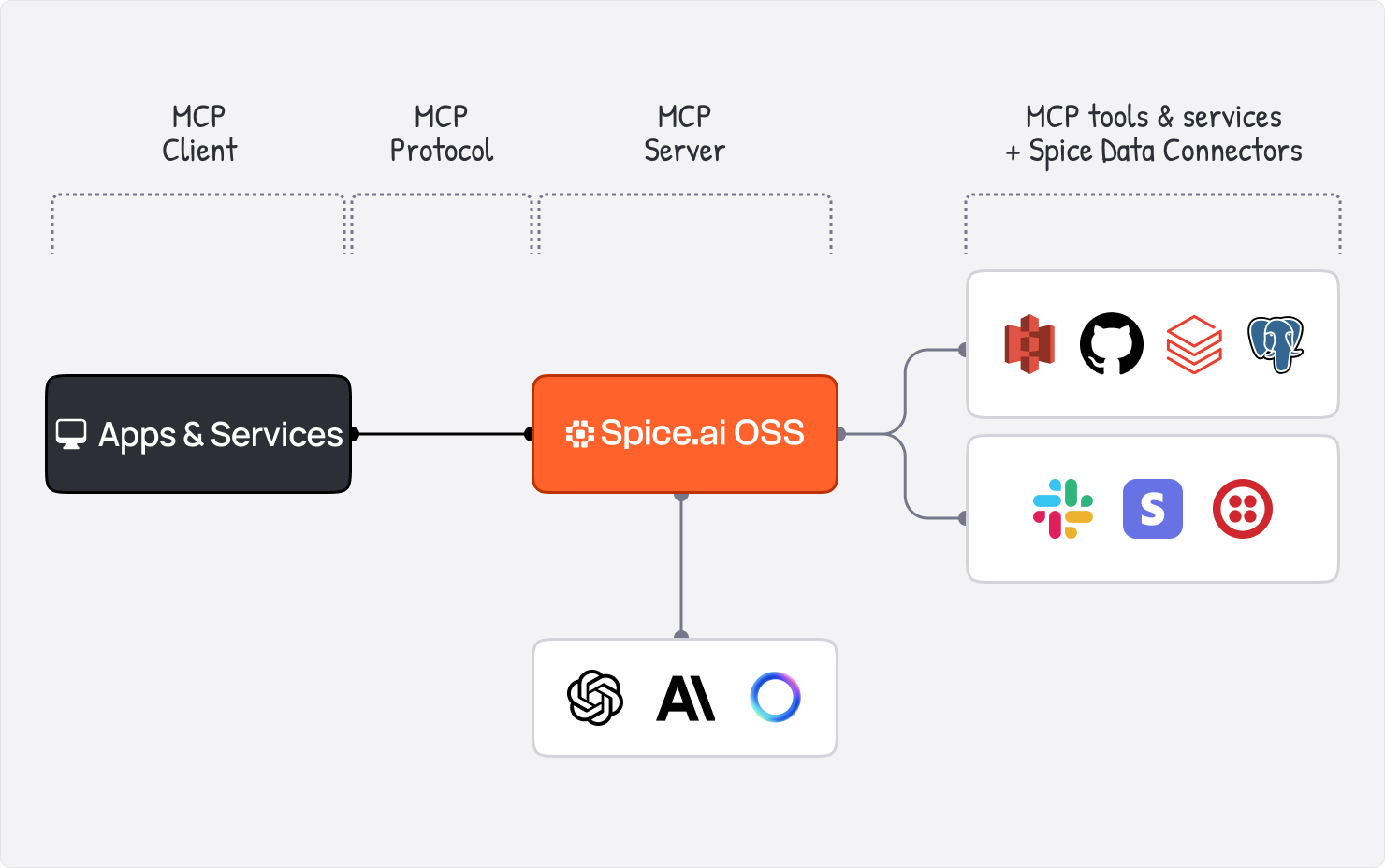
The Model Context Protocol (MCP) helps integrate external tools and services into the Spice runtime. MCP tools can be run internally or connected over HTTP using the Streamable HTTP transport.
Overview
MCP enables Spice to:
- Run stdio-based MCP servers internally.
- Connect to external MCP servers over Streamable HTTP.
This flexibility helps extend the capabilities of language models by providing access to external tools and services.
Protocol Versions
Spice is dual-era. It serves the 2026-07-28 revision and still answers the legacy initialize handshake, so existing clients on earlier revisions — including 2025-03-26 — keep working unchanged.
| Era | How a client talks to Spice | Session |
|---|---|---|
Modern (2026-07-28) | server/discover, then tools/list and tools/call with per-request _meta — no initialize first | Sessionless. No Mcp-Session-Id. |
Legacy (2025-11-25 and earlier, including 2025-03-26) | initialize, then notifications/initialized | Spice mints an Mcp-Session-Id and requires it on subsequent requests. |
Spice advertises 2026-07-28 and accepts 2024-11-05, 2025-03-26, 2025-06-18, 2025-11-25, and 2026-07-28, the list server/discover returns in supportedVersions. A legacy client negotiates the revision it requests in initialize. An initialize that requests 2026-07-28, or a revision Spice does not support, is answered with 2025-11-25, the newest legacy revision.
Modern clients send the MCP-Protocol-Version, Mcp-Method, and — for tools/call — Mcp-Name Streamable HTTP headers. A tool argument annotated with x-mcp-header additionally requires a matching Mcp-Param-<name> header whose value equals that argument in the JSON-RPC body.
| Condition | Response |
|---|---|
| A modern request whose protocol version this runtime does not support | HTTP 400 with JSON-RPC -32022; data.supported lists the revisions it accepts |
| A Streamable HTTP header that disagrees with the JSON-RPC body | HTTP 400 with JSON-RPC -32020 |
GET /v1/mcp (the server-to-client SSE stream) and DELETE /v1/mcp (session teardown) are legacy-era only — both act on an Mcp-Session-Id. Spice does not serve subscriptions/listen, the 2026-07-28 notification stream: the request returns HTTP 404 with JSON-RPC -32601 (method not found).
When Spice connects to another MCP server (from: mcp:<url>, or a stdio server), it negotiates the same two eras automatically: it prefers server/discover at 2026-07-28 and falls back to initialize at 2025-03-26 when the peer answers server/discover with an error or does not answer it within 10 seconds. A peer that never answers server/discover therefore delays runtime startup by 10 seconds. Liveness is probed with ping, and — because 2026-07-28 has no ping — a failed ping is retried as an uncached tools/list before the connection is treated as dead.
Configuring MCP Tools
To configure MCP tools, define them in the tools section of your spicepod.yaml file. The from field specifies the transport mechanism (e.g., mcp:npx for stdio or an HTTP URL for Streamable HTTP).
Example: Adding an MCP Tool
tools:
  - name: google_maps
    from: mcp:npx
    params:
      mcp_args: -y @modelcontextprotocol/server-google-maps
Example: Connecting to an External MCP Server
tools:
  - name: external_mcp_server
    from: mcp:http://example.com/v1/mcp
Using MCP Tools with Models
Once configured, MCP tools can be assigned to models via the tools parameter.
models:
  - name: model_with_mcp
    from: openai:gpt-4o
    params:
      tools: google_maps
Spice as an MCP Server
Spice can also act as an MCP server, exposing its tools over Streamable HTTP. This enables other Spice instances or external systems to connect and use the tools.
Authentication
The /v1/mcp endpoint requires runtime.auth to be configured. Without it, every request is rejected with 401 Unauthorized, including requests from local clients:
runtime:
  auth:
    api_key:
      enabled: true
      keys:
        - ${secrets:SPICE_API_KEY}
Clients then authenticate with an X-API-KEY header.
Each tools/call runs as the API key on its own request, on both protocol eras. A read-only key, one without the :rw suffix, cannot write through the sql or store_memory tools, even on a legacy session that a read-write key opened:
{"jsonrpc":"2.0","id":3,"error":{"code":-32603,"message":"Failed to store memories: the API key on this request does not allow write access. Retry with a read-write API key (a `runtime.auth.api-key.keys` entry ending in `:rw`). See https://spiceai.org/docs/api/auth"}}
Example: Connecting to another Spice instance via MCP
Because the remote endpoint requires authentication, pass credentials with mcp_headers — or mcp_auth_token to send Authorization: Bearer. See Connecting to an Auth-Enabled MCP Server.
tools:
  - name: spice_instance
    from: mcp:http://localhost:8090/v1/mcp
    params:
      mcp_headers: 'X-API-KEY: ${secrets:SPICE_API_KEY}'
The remote instance runs every proxied tool call as that key. A read-only key can run queries through the remote sql tool, but the remote refuses writes. Use a key with the :rw suffix only when the proxied tools need to write.
Allowed Hosts
By default the /v1/mcp endpoint only accepts requests with a Host header matching localhost, 127.0.0.1, or ::1 to prevent DNS rebinding attacks. To allow additional hosts, configure runtime.mcp.allowed_hosts:
runtime:
  mcp:
    allowed_hosts:
      - localhost
      - my-host.internal:8090
Set allowed_hosts: ["*"] to disable host checking entirely.
Allowed Origins
Separately from the Host check, /v1/mcp validates the browser Origin header against runtime.cors.allowed_origins — there is no MCP-specific origin setting.
runtime.cors.allowed_origins | Effect on /v1/mcp |
|---|---|
Default (["*"]) or an empty list | Expands to the localhost origins http://localhost, http://127.0.0.1, http://[::1] and their https:// forms. Entries carry no port, so any port on those hosts matches. |
| Explicit list | Only the listed origins are accepted. A request whose Origin is not on the list receives 403 Forbidden. |
A request that sends no Origin header at all is accepted in every case, which is why MCP clients such as Cursor and Claude Desktop are unaffected.
["*"] does not accept every Origin on /v1/mcp. * is not a valid RFC 6454 origin, so it expands to the localhost defaults above rather than disabling the check — unlike runtime.mcp.allowed_hosts, where ["*"] does disable the Host check. A remote browser-based MCP client must be given a concrete runtime.cors.allowed_origins list:
runtime:
  cors:
    allowed_origins:
      - https://app.example.com
This affects only MCP Origin validation. Browser CORS on the other HTTP endpoints is unchanged: allowed_origins: ["*"] remains allow-all there.
Additional Configuration Options
from
The from field specifies the transport mechanism for the MCP tool:
- Streamable HTTP: Use an HTTP URL pointing to the MCP endpoint (e.g.,
http://localhost:8090/v1/mcp). - Stdio: Use commands like
mcp:npxormcp:docker. Additional arguments can be passed viaparams.mcp_args.
params
The params field provides additional configuration for MCP tools. For stdio-based tools, use mcp_args to specify command-line arguments.
tools:
  - name: custom_tool
    from: mcp:npx
    params:
      mcp_args: -y @custom/tool
env
For stdio-based MCP tools, environment variables can be set using the env field.
tools:
  - name: tool_with_env
    from: mcp:docker
    env:
      API_KEY: your_api_key
For more details, see the MCP Tools Reference.
Example: Spice as an MCP gateway for GitHub and Jira
Spice can act as a unified MCP gateway, proxying multiple external MCP servers alongside its own built-in tools. Clients connect to a single /v1/mcp endpoint and see one combined tool catalog.
version: v1
kind: Spicepod
name: mcp-gateway

# Required — /v1/mcp returns 401 to every request without runtime.auth
runtime:
  auth:
    api_key:
      enabled: true
      keys:
        - ${secrets:SPICE_API_KEY}

# GitHub issues and PRs accelerated in-memory for fast SQL queries
datasets:
  - from: github:github.com/your-org/your-repo/issues
    name: github_issues
    description: GitHub issues — filterable by state, label, assignee, or milestone
    params:
      github_token: ${secrets:GITHUB_PERSONAL_ACCESS_TOKEN}
      github_query_mode: search
    time_column: updated_at
    acceleration:
      enabled: true
      refresh_check_interval: 5m

  - from: github:github.com/your-org/your-repo/pulls
    name: github_pulls
    description: GitHub pull requests — open, merged, or closed
    params:
      github_token: ${secrets:GITHUB_PERSONAL_ACCESS_TOKEN}
      github_query_mode: search
    time_column: updated_at
    acceleration:
      enabled: true
      refresh_check_interval: 5m

# MCP servers proxied through Spice's /v1/mcp endpoint
tools:
  - name: github
    from: mcp:npx
    description: GitHub tools — create issues, review PRs, search code
    params:
      mcp_args: -y @modelcontextprotocol/server-github
    env:
      GITHUB_PERSONAL_ACCESS_TOKEN: ${secrets:GITHUB_PERSONAL_ACCESS_TOKEN}

  - name: jira
    from: mcp:uvx
    description: Jira and Confluence tools — query tickets, update status, search projects
    params:
      mcp_args: mcp-atlassian
    env:
      JIRA_URL: ${secrets:JIRA_URL}
      JIRA_USERNAME: ${secrets:JIRA_USERNAME}
      JIRA_API_TOKEN: ${secrets:JIRA_API_TOKEN}
With this configuration, clients connecting to /v1/mcp see a single catalog that includes:
- Spice built-in tools:
sql,list_datasets,table_schema,search, and more - GitHub MCP tools:
github__create_issue,github__list_pull_requests,github__search_code, and more - Jira MCP tools:
jira__jira_get_issue,jira__jira_search,jira__jira_create_issue, and more
Proxied tool names
A proxied tool is exposed as <tool-name>__<upstream-tool-name>, joined by a double underscore. The tool-name is the name given in the tools section, so renaming the tool renames every tool it proxies.
The separator is not a /, because MCP clients such as Claude and Cursor reject any tool name that does not match ^[a-zA-Z0-9_-]{1,64}$.
Where an upstream server already namespaces its own tools, the prefix appears doubled — mcp-atlassian exposes jira_get_issue, so a tool named jira yields jira__jira_get_issue. This is expected.
Jira credentials
The jira tool contributes no tools at all unless all three JIRA_* values resolve. mcp-atlassian starts successfully without them, registers nothing, and Spice logs no tool-loading error — the runtime reports healthy with Jira silently missing from the catalog. Check the startup log for runtime_secrets errors if jira__* tools do not appear.
JIRA_URL depends on which kind of API token is used, and a mismatch is the most common cause of an empty Jira catalog:
| Token type | JIRA_URL |
|---|---|
| Classic (unscoped) API token | https://your-org.atlassian.net |
| Scoped API token | https://api.atlassian.com/ex/jira/<cloud-id> |
Scoped tokens authenticate only against the api.atlassian.com gateway and return 401 against the site URL. Retrieve the cloud ID for a site from https://your-org.atlassian.net/_edge/tenant_info, which requires no authentication. Both token types use JIRA_USERNAME (the account email address) with HTTP basic auth.
Connecting a client
Connect Claude Code to this gateway with a single command, using a key from runtime.auth:
claude mcp add --transport http spice http://localhost:8090/v1/mcp --header "X-API-KEY: <key>"
The two servers above expose close to 100 tools between them, which degrades tool selection in most MCP clients. Restrict each server to the tools actually needed — for mcp-atlassian, set TOOLSETS in its env block.
See the mcp-server cookbook for a complete runnable example.
Troubleshooting
A tool is missing from the catalog
A failing MCP server does not stop the runtime. Spice logs a warning, retries the connection in the background, and reports healthy — the tool is simply absent from tools/list. Verify the runtime log at startup:
grep "Unable to load tool" "<log>"
A server that starts but authenticates with empty or invalid credentials is harder to spot: it registers zero tools without producing that warning. Check for runtime_secrets errors, which indicate a ${secrets:...} reference that did not resolve.
Every request returns 401
/v1/mcp requires runtime.auth. The response body names the missing configuration:
{ "message": "MCP endpoint (/v1/mcp) requires `runtime.auth` to be configured. ..." }
Every request returns 403
The Host header is not in runtime.mcp.allowed_hosts. This is the DNS-rebinding guard, and it applies to any host other than localhost, 127.0.0.1, or ::1.
Listing the catalog directly
To confirm what a client actually sees, call tools/list over the Streamable HTTP transport. The Accept header must offer both content types, and the session ID returned by initialize is required on subsequent requests:
curl -sS -D headers.txt -X POST http://localhost:8090/v1/mcp \
  -H 'Content-Type: application/json' \
  -H 'Accept: application/json, text/event-stream' \
  -H 'X-API-KEY: <key>' \
  -d '{"jsonrpc":"2.0","id":1,"method":"initialize","params":{"protocolVersion":"2025-06-18","capabilities":{},"clientInfo":{"name":"curl","version":"1"}}}'

SID=$(grep -i mcp-session-id headers.txt | tr -d '\r' | awk '{print $2}')

curl -sS -X POST http://localhost:8090/v1/mcp \
  -H 'Content-Type: application/json' \
  -H 'Accept: application/json, text/event-stream' \
  -H 'X-API-KEY: <key>' \
  -H "Mcp-Session-Id: $SID" \
  -d '{"jsonrpc":"2.0","id":2,"method":"tools/list","params":{}}'
Responses are returned as SSE frames prefixed with data:.
Cookbook
- A cookbook recipe to connect to MCP servers and use MCP tools with Spice. Model Context Protocol with Spice
- A cookbook recipe to run Spice as an MCP server and connect an AI assistant to it. Spice as MCP Server
