Snowflake Data Connector
The Snowflake Data Connector enables federated SQL queries across datasets in the Snowflake Cloud Data Warehouse.
datasets:
  - from: snowflake:DATABASE.SCHEMA.TABLE
    name: table
    params:
      snowflake_warehouse: COMPUTE_WH
      snowflake_role: accountadmin
Unquoted table identifiers should be UPPERCASED in the from field. See Identifier resolution.
Configuration
from
A Snowflake fully qualified table name (database.schema.table). For instance snowflake:SNOWFLAKE_SAMPLE_DATA.TPCH_SF1.LINEITEM or snowflake:TAXI_DATA."2024".TAXI_TRIPS
name
The dataset name. This will be used as the table name within Spice. The dataset name cannot be a [reserved keyword(../../reference/spicepod/keywords) or any of the following keywords that are reserved by Snowflake:
STARTCONNECTMATCH_RECOGNIZESAMPLETABLESAMPLEFROM
params
| Parameter Name | Description |
|---|---|
snowflake_warehouse | Optional, specifies the Snowflake Warehouse to use |
snowflake_role | Optional, specifies the role to use for accessing Snowflake data |
snowflake_account | Required, specifies the Snowflake account-identifier |
snowflake_username | Required, specifies the Snowflake username to use for accessing Snowflake data |
snowflake_password | Required when snowflake_auth_type is snowflake (default). Specifies the Snowflake password for authentication |
snowflake_private_key_path | Required when snowflake_auth_type is keypair. Specifies the path to the private key file. |
snowflake_private_key_passphrase | Required when the private key is encrypted. Specifies the passphrase to decrypt the private key. |
Auth
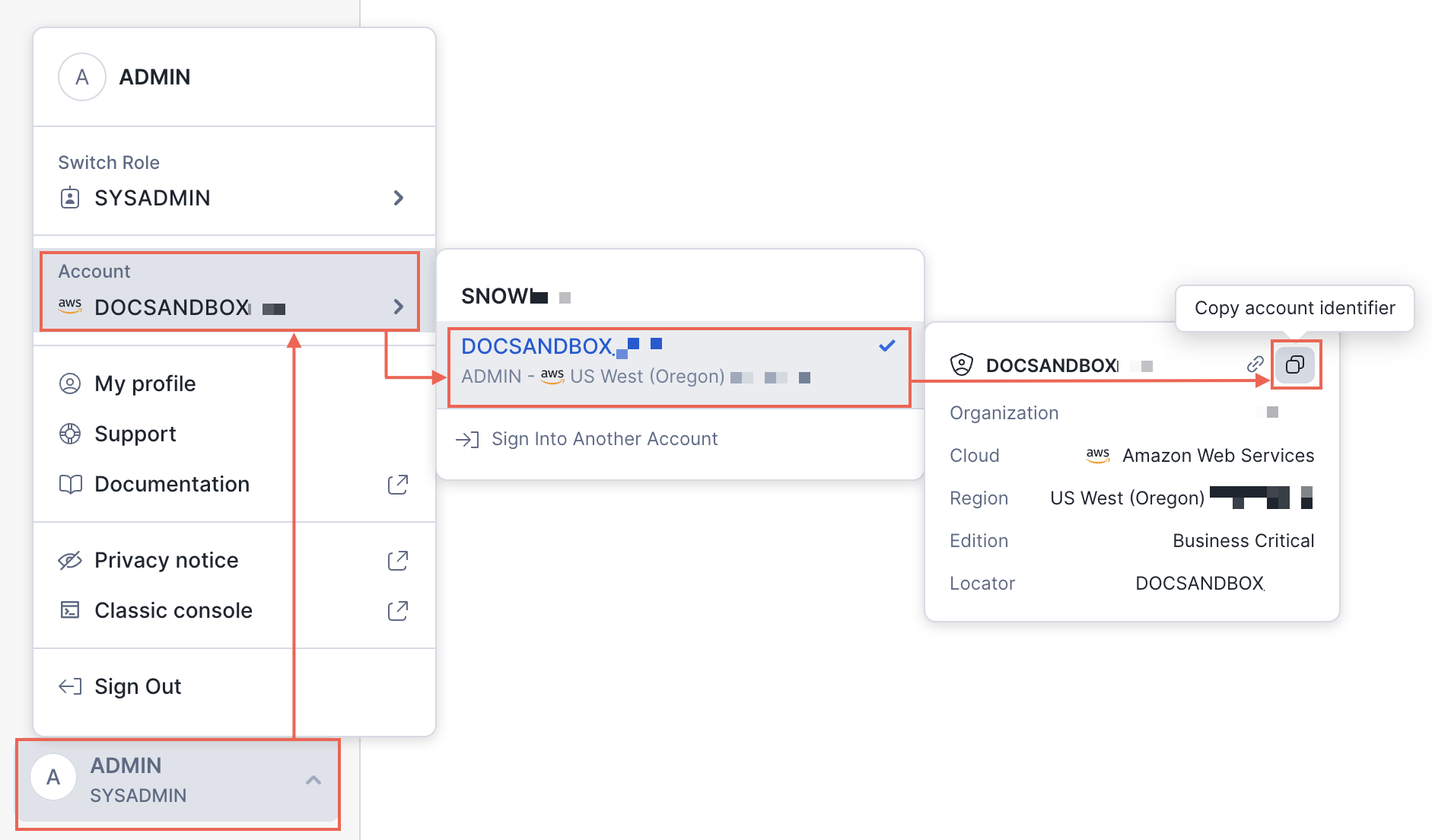
The connector supports password-based and key-pair authentication that must be configured using spice login snowflake or using [Secrets Stores(../secret-stores). Login requires the account identifier ('orgname-accountname' format) - use Finding the organization and account name for an account instructions.
- Env
- Kubernetes
# Password-based
SPICE_SNOWFLAKE_ACCOUNT="<account-identifier>" \
SPICE_SNOWFLAKE_USERNAME="<username>" \
SPICE_SNOWFLAKE_PASSWORD="<password>" \
spice run
# Key-pair (the `<private-key-passphrase>` is an optional parameter and is used for encrypted private key only)
SPICE_SNOWFLAKE_ACCOUNT="<account-identifier>" \
SPICE_SNOWFLAKE_USERNAME="<username>" \
SPICE_SNOWFLAKE_SNOWFLAKE_PRIVATE_KEY_PATH="<path-to-private-key>" \
SPICE_SNOWFLAKE_SNOWFLAKE_PRIVATE_KEY_PASSPHRASE="<private-key-passphrase>" \
spice run
or using the Spice CLI:
# Password-based
spice login snowflake -a "<account-identifier>" -u "<username>" -p "<password>"
# Key-pair (the `<private-key-passphrase>` is an optional parameter and is used for encrypted private key only)
spice login snowflake -a "<account-identifier>" -u "<username>" -k "<path-to-private-key>" -s "<private-key-passphrase>"
The CLI will create or update an .env file that looks like:
SPICE_SNOWFLAKE_ACCOUNT="account"
SPICE_SNOWFLAKE_PASSWORD="pass"
SPICE_SNOWFLAKE_USERNAME="user"
Configure the spicepod to load secrets from the env secret store: (Note: This is the default setting)
spicepod.yaml
version: v1
kind: Spicepod
name: spice-app

secrets:
  - from: env
    name: env

datasets:
  - from: snowflake:DATABASE.SCHEMA.TABLE
    name: table
    params:
      snowflake_warehouse: COMPUTE_WH
      snowflake_role: accountadmin
      snowflake_username: ${env:SPICE_SNOWFLAKE_USERNAME}
      snowflake_password: ${env:SPICE_SNOWFLAKE_PASSWORD}
      snowflake_account: ${env:SPICE_SNOWFLAKE_ACCOUNT}
Learn more about [Env Secret Store(../secret-stores/env).
# Password-based
kubectl create secret generic snowflake \
  --from-literal=account='<account-identifier>' \
  --from-literal=username='<username>' \
  --from-literal=password='<password>'

# Key-pair (the `<private-key-passphrase>` is an optional parameter and is used for encrypted private key only)
kubectl create secret generic snowflake \
  --from-literal=account='<account-identifier>' \
  --from-literal=username='<username>' \
  --from-literal=snowflake_private_key_path='<path-to-private-key>' \
  --from-literal=snowflake_private_key_passphrase='<private-key-passphrase>'
spicepod.yaml
version: v1
kind: Spicepod
name: spice-app

secrets:
  - from: kubernetes:snowflake
    name: snowflake

datasets:
  - from: snowflake:DATABASE.SCHEMA.TABLE
    name: table
    params:
      snowflake_warehouse: COMPUTE_WH
      snowflake_role: accountadmin
      snowflake_username: ${snowflake:username}
      snowflake_password: ${snowflake:password}
      snowflake_account: ${snowflake:account}
spicepod.yaml (key-pair with private key content from secret)
version: v1
kind: Spicepod
name: spice-app

secrets:
  - from: kubernetes:snowflake
    name: snowflake

datasets:
  - from: snowflake:DATABASE.SCHEMA.TABLE
    name: table
    params:
      snowflake_warehouse: COMPUTE_WH
      snowflake_role: accountadmin
      snowflake_auth_type: keypair
      snowflake_username: ${snowflake:username}
      snowflake_private_key: ${snowflake:private_key}
      snowflake_account: ${snowflake:account}
` ```

Learn more about [Kubernetes Secret Store(../secret-stores/kubernetes).

</TabItem>
<TabItem value="keyring" label="Keyring">
Add new keychain entries (macOS) for user and password:

```bash
# Password-based
security add-generic-password -l "Snowflake Secret" \
-a spiced -s spice_snowflake_password\
-w <password>

# Key-pair (the `<private-key-passphrase>` is an optional parameter and is used for encrypted private key only)
security add-generic-password -l "Snowflake Secret" \
-a spiced -s spice_snowflake_snowflake_private_key_path\
-w $(echo -n '<path-to-private-key>' | base64)
spicepod.yaml
version: v1
kind: Spicepod
name: spice-app

secrets:
  - from: keyring
    name: keyring

datasets:
  - from: snowflake:DATABASE.SCHEMA.TABLE
    name: table
    params:
      snowflake_warehouse: COMPUTE_WH
      snowflake_role: accountadmin
      snowflake_username: user_name
      snowflake_password: ${keyring:spice_snowflake_password}
      snowflake_account: account_identifier
Learn more about [Keyring Secret Store(../secret-stores/keyring).
Example
datasets:
  - from: snowflake:SNOWFLAKE_SAMPLE_DATA.TPCH_SF1.LINEITEM
    name: lineitem
    params:
      snowflake_warehouse: COMPUTE_WH
      snowflake_role: accountadmin
- Account identifier does not support the Legacy account locator in a region format. Use Snowflake preferred name in organization format.
- The connector supports password-based and key-pair authentication.
Secrets
Spice integrates with multiple secret stores to help manage sensitive data securely. For detailed information on supported secret stores, refer to the [secret stores documentation(../secret-stores). Additionally, learn how to use referenced secrets in component parameters by visiting the [using referenced secrets guide(../secret-stores#using-secrets).
Cookbook
- A cookbook recipe to configure Snowflake as a data connector in Spice. Snowflake Data Connector
